
 返回首页
返回首页
 回到顶部
回到顶部

Mind+ 作为一款融合图形化与代码编程的综合创作平台,一直致力于降低人工智能的学习门槛。而 Mind+ V2 深度进化的 AI 工具箱,让模型训练向不同背景的使用者开放,简化为人人都能玩转的AI“魔法工具”!
为了挖掘更多具有不同背景、学习价值和创意火花的 AI 应用场景,DF创客社区正式发起“ AI“重构”生活——Mind+ V2 模型训练挑战赛”!无论你是想让计算机学会覆盖图像、音频、姿态和文本等领域的“看、听、辨、析”,还是希望实现硬件深度智能交互与实际应用的完整闭环,这里都是你释放创造力、展现思考力、体现技术力的舞台!
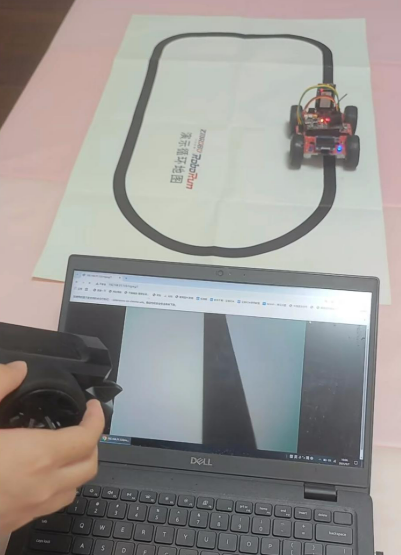
之前看到过汤老师的利用手机浏览器做训练部署三分类实现自动驾驶的方案,现在有mind+V2,实现上可能更加方便,就尝试了一下,没想到还挺顺利的,特别是用了双线道路方案后,效果非常nice,直接看效果!
下面,我来简单讲解一下项目实现过程:
步骤1 项目准备
1) Mind+ V2: 训练模型,部署模型
Mind+官网: https://mindplus.cc/

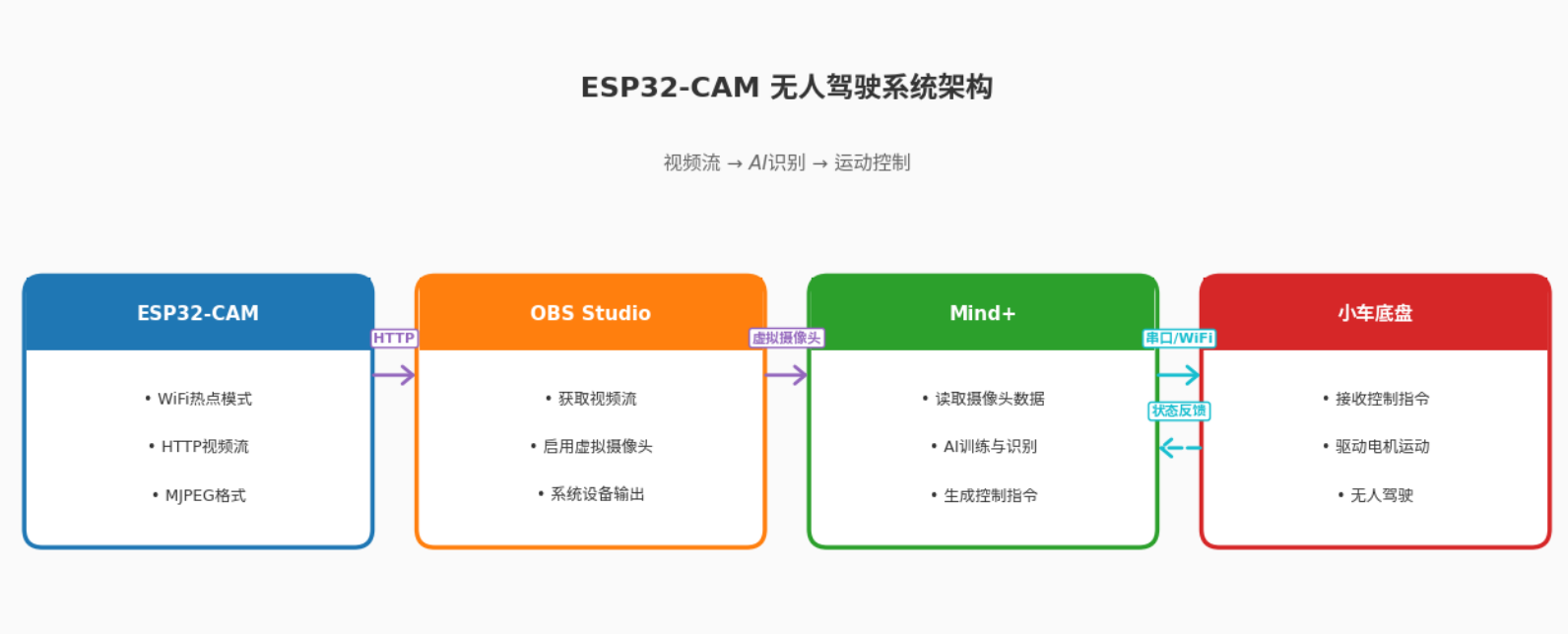
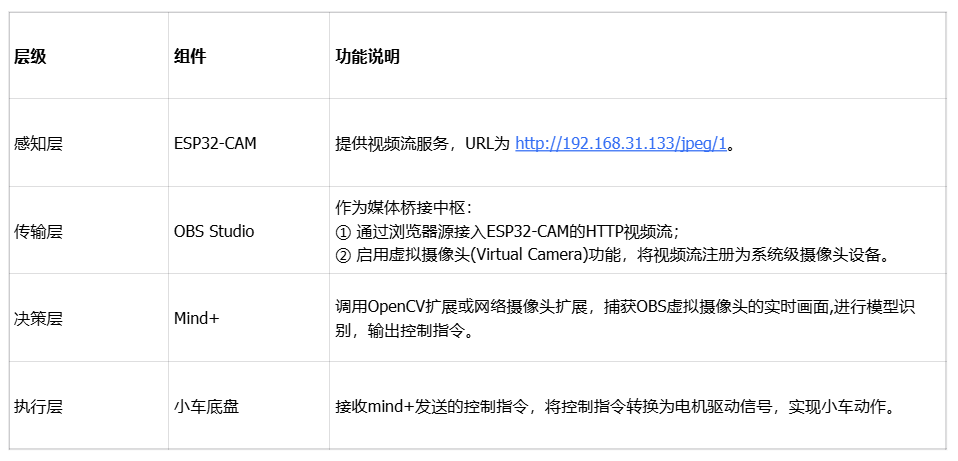
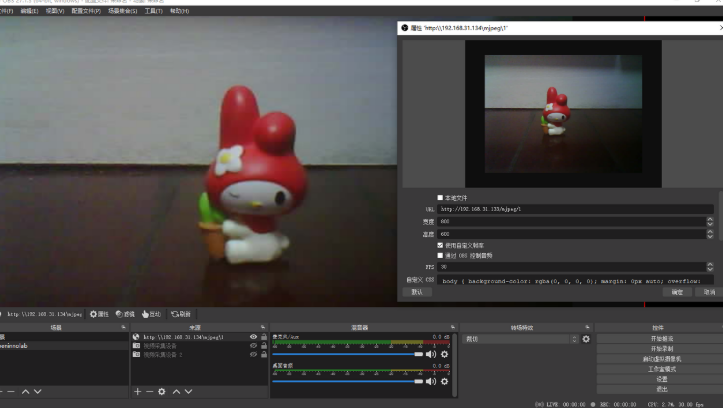
2) OBS studio: 获取ESP32CAM视频流,并推送给Mind+ V2,进行图像采集
OBS官网: https://obsproject.com/

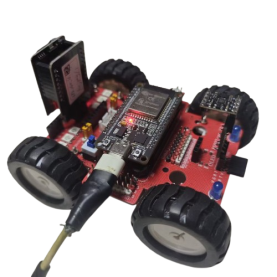
3) Esp32小车: 工具载体
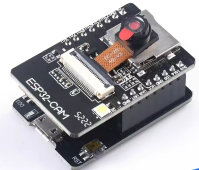
4) ESPCAM摄像头: 提供视频流
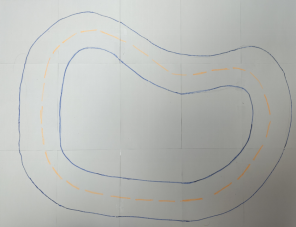
5) 手绘地图: 简单增强特征,蓝色边界线和黄色中心线
步骤2 项目架构
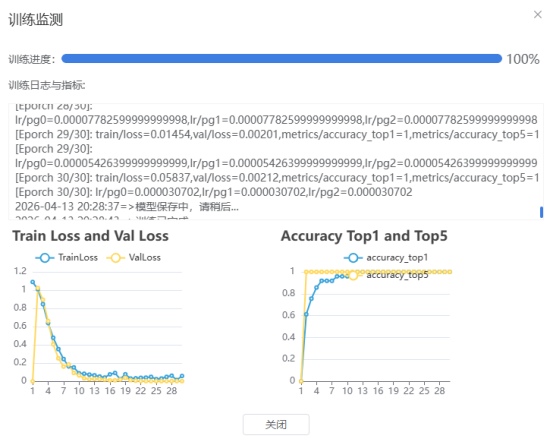
步骤3 模型训练
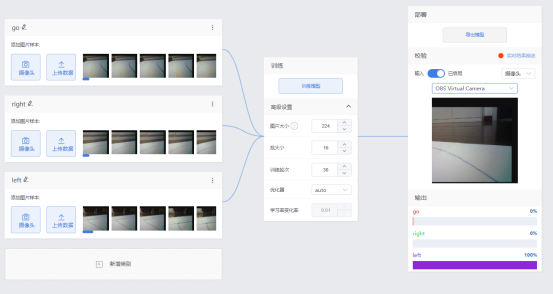
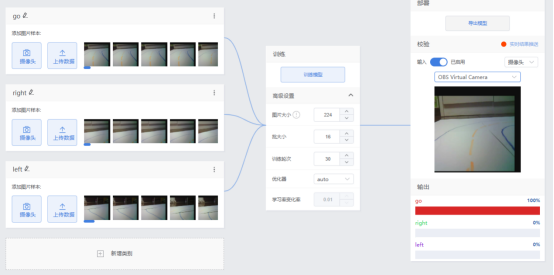
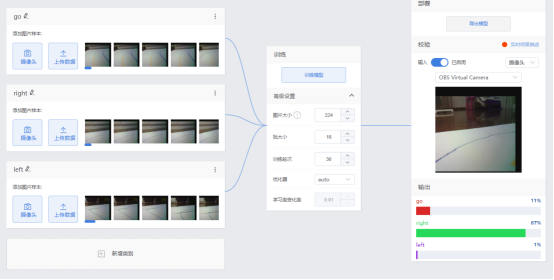
步骤4 程序设计(框架,代码)
电脑端
这是一个图像分类控制程序,核心功能:
图像识别 — 用摄像头捕捉画面,通过AI模型识别提供"前进/左转/右转"三种决策
发送指令 — 通过UDP网络把识别结果实时发给ESP32小车
实时显示 — 屏幕上展示识别结果、置信度、帧率等信息
"""
Mind+ 图像分类 - UDP低延迟实时识别发送端
支持 left/go/right 手势识别
"""

import cv2
import numpy as np
import onnxruntime as ort
import yaml
import socket
import time
from datetime import datetime

# ========== 配置区域 ==========
MODEL_PATH = "best.onnx"
YAML_PATH = "data.yaml"
CAMERA_ID = 2  # ESP32CAM 摄像头ID
CONFIDENCE_THRESHOLD = 0.45  # 置信度阈值

# UDP配置
ESP32_IP = "192.168.31.179"  #ESP32小车的IP地址
UDP_PORT = 5005

# 控制参数
SEND_INTERVAL_MIN = 0.15  # 最小发送间隔150ms
DEBOUNCE_TIME = 0.6       # 相同指令去抖动600ms
CONSECUTIVE_FRAMES = 2    # 连续识别帧数要求

# 支持的指令列表(从yaml自动加载,这里只做验证)
SUPPORTED_COMMANDS = ['go', 'left', 'right']  # 默认支持的命令
# ============================

class CameraClassifier:
    def __init__(self, model_path, yaml_path):
        print("加载模型中...")
        self.session = ort.InferenceSession(model_path, providers=['CPUExecutionProvider'])

        # 加载标签
        with open(yaml_path, 'r', encoding='utf-8') as f:
            data = yaml.safe_load(f)
            print(f"原始yaml数据: {data}")

            if 'labels' in data and isinstance(data['labels'], dict):
                self.labels = [data['labels'][i] for i in sorted(data['labels'].keys())]
            elif 'names' in data:
                self.labels = data['names']
            else:
                # 默认标签
                self.labels = ['go', 'left', 'right']

            print(f"解析后的标签: {self.labels}")

            # 验证是否包含必需的指令
            for cmd in SUPPORTED_COMMANDS:
                if cmd not in self.labels:
                    print(f"⚠️ 警告: 标签列表中缺少 '{cmd}',当前标签: {self.labels}")

        # 获取模型输入信息
        self.input_name = self.session.get_inputs()[0].name
        self.input_shape = self.session.get_inputs()[0].shape
        self.input_size = (self.input_shape[2], self.input_shape[3])

        print(f"模型输入尺寸: {self.input_size}")
        print(f"模型输出类别数: {self.session.get_outputs()[0].shape[1]}")
        print(f"支持的指令: {self.labels}")

    def preprocess(self, image):
        """图像预处理"""
        resized = cv2.resize(image, self.input_size)
        rgb = cv2.cvtColor(resized, cv2.COLOR_BGR2RGB)
        normalized = rgb.astype(np.float32) / 255.0
        input_tensor = np.transpose(normalized, (2, 0, 1))
        return np.expand_dims(input_tensor, axis=0).astype(np.float32)

    def predict(self, image):
        """执行推理"""
        input_tensor = self.preprocess(image)
        outputs = self.session.run(None, {self.input_name: input_tensor})

        logits = outputs[0][0]

        # Softmax
        exp_logits = np.exp(logits - np.max(logits))
        probs = exp_logits / np.sum(exp_logits)

        pred_idx = np.argmax(probs)
        confidence = probs[pred_idx]
        label = self.labels[pred_idx]

        probs_dict = {self.labels[i]: float(probs[i]) for i in range(len(self.labels))}

        return {
            'label': label,
            'confidence': float(confidence),
            'probs': probs_dict
        }

class UDPController:
    def __init__(self, esp32_ip, udp_port):
        self.esp32_addr = (esp32_ip, udp_port)
        self.sock = socket.socket(socket.AF_INET, socket.SOCK_DGRAM)
        self.sock.settimeout(0.1)

        # 状态追踪
        self.last_command = None
        self.last_send_time = 0
        self.consecutive_frames = 0
        self.current_command = None
        self.frame_results = []  # 存储最近几帧的结果

        # 发送统计
        self.send_count = {'go': 0, 'left': 0, 'right': 0}

        print(f"UDP控制器初始化完成,目标: {esp32_ip}:{udp_port}")

    def send_command(self, command):
        """发送UDP指令"""
        try:
            self.sock.sendto(command.encode(), self.esp32_addr)
            # 更新统计
            if command in self.send_count:
                self.send_count[command] += 1
            print(f"✓ 已发送: {command} (总发送: go:{self.send_count['go']} left:{self.send_count['left']} right:{self.send_count['right']})")
            return True
        except Exception as e:
            print(f"UDP发送失败: {e}")
            return False

    def test_connection(self):
        """测试ESP32连接"""
        print("测试UDP连接...")
        return self.send_command("test")

    def update_and_decide(self, result):
        """
        智能决策是否发送指令
        返回: (should_send, command)
        """
        current_time = time.time()
        command = result['label']
        confidence = result['confidence']

        # 打印置信度值(调试用)
        print(f"[调试] 识别结果: {command}, 置信度: {confidence:.3f} (阈值: {CONFIDENCE_THRESHOLD})")

        # 置信度不足,重置计数
        if confidence < CONFIDENCE_THRESHOLD:
            print(f"[调试] 置信度不足,不处理 (需要 ≥ {CONFIDENCE_THRESHOLD})")
            self.consecutive_frames = 0
            self.current_command = None
            return False, None

        # 更新连续帧计数
        if command == self.current_command:
            self.consecutive_frames += 1
            print(f"[调试] 连续识别相同指令 '{command}': {self.consecutive_frames}/{CONSECUTIVE_FRAMES}")
        else:
            self.current_command = command
            self.consecutive_frames = 1
            print(f"[调试] 新指令 '{command}',开始计数: {self.consecutive_frames}/{CONSECUTIVE_FRAMES}")

        # 检查是否达到连续帧数要求
        if self.consecutive_frames < CONSECUTIVE_FRAMES:
            print(f"[调试] 连续帧数不足,等待更多帧确认")
            return False, None

        # 发送逻辑
        should_send = False
        reason = ""

        if command != self.last_command:
            # 新指令,快速响应
            if current_time - self.last_send_time > SEND_INTERVAL_MIN:
                should_send = True
                reason = "新指令"
            else:
                reason = f"发送间隔过短 ({current_time - self.last_send_time:.2f}s < {SEND_INTERVAL_MIN}s)"
        else:
            # 相同指令,去抖动
            time_since_last = current_time - self.last_send_time
            if time_since_last > DEBOUNCE_TIME:
                should_send = True
                reason = f"相同指令去抖动结束 ({time_since_last:.2f}s > {DEBOUNCE_TIME}s)"
            else:
                reason = f"相同指令去抖动中 ({time_since_last:.2f}s < {DEBOUNCE_TIME}s)"

        if should_send:
            self.last_command = command
            self.last_send_time = current_time
            print(f"[调试] ✅ 满足发送条件: {reason}")
            return True, command
        else:
            print(f"[调试] ❌ 不发送: {reason}")
            return False, None

def draw_optimized_ui(frame, result, controller, fps):
    """优化UI显示"""
    h, w = frame.shape[:2]

    # 半透明背景
    overlay = frame.copy()
    cv2.rectangle(overlay, (0, 0), (w, 120), (0, 0, 0), -1)
    frame = cv2.addWeighted(overlay, 0.6, frame, 0.4, 0)

    # 根据不同的手势使用不同颜色
    gesture_colors = {
        'go': (0, 255, 0),      # 绿色
        'left': (255, 165, 0),  # 橙色
        'right': (0, 165, 255)  # 蓝色
    }

    # 主结果显示
    if result['confidence'] >= CONFIDENCE_THRESHOLD:
        text = f"Gesture: {result['label'].upper()}"
        color = gesture_colors.get(result['label'], (0, 255, 0))
        bg_color = (0, 100, 0)
    else:
        text = f"Detecting... ({result['label']})"
        color = (0, 165, 255)
        bg_color = (100, 100, 0)

    # 标题背景
    cv2.rectangle(frame, (0, 0), (w, 50), bg_color, -1)
    cv2.putText(frame, text, (10, 35), cv2.FONT_HERSHEY_SIMPLEX, 1.0, color, 2)

    # 置信度条
    bar_width = int(result['confidence'] * 300)
    cv2.rectangle(frame, (10, 60), (310, 80), (50, 50, 50), -1)
    cv2.rectangle(frame, (10, 60), (10 + bar_width, 80), color, -1)
    cv2.putText(frame, f"Confidence: {result['confidence']:.2%}", (10, 78),
                cv2.FONT_HERSHEY_SIMPLEX, 0.5, (255, 255, 255), 1)

    # 状态信息
    y_offset = 95
    status_color = (200, 200, 200)

    # 最后发送的指令
    last_cmd = controller.last_command if controller.last_command else "None"
    cv2.putText(frame, f"Last Send: {last_cmd}", (10, y_offset),
                cv2.FONT_HERSHEY_SIMPLEX, 0.5, (100, 255, 100), 1)

    # 连续帧计数
    cv2.putText(frame, f"Stable Frames: {controller.consecutive_frames}/{CONSECUTIVE_FRAMES}",
                (200, y_offset), cv2.FONT_HERSHEY_SIMPLEX, 0.5, (255, 255, 100), 1)

    # FPS显示
    cv2.putText(frame, f"FPS: {fps:.1f}", (w - 80, 25),
                cv2.FONT_HERSHEY_SIMPLEX, 0.6, (0, 255, 255), 2)

    # ESP32状态
    cv2.putText(frame, f"ESP32: {ESP32_IP}:{UDP_PORT}", (w - 200, h - 10),
                cv2.FONT_HERSHEY_SIMPLEX, 0.4, (150, 150, 150), 1)

    # 各类别概率 - 显示所有支持的手势
    y_start = 130
    for i, (label, prob) in enumerate(result['probs'].items()):
        y = y_start + 30 * i
        prob_width = int(prob * 200)
        cv2.rectangle(frame, (10, y - 12), (210, y - 2), (40, 40, 40), -1)
        if prob_width > 0:
            color = gesture_colors.get(label, (0, 200, 0))
            cv2.rectangle(frame, (10, y - 12), (10 + prob_width, y - 2),
                         color if label == result['label'] else (100, 100, 100), -1)
        cv2.putText(frame, f"{label}: {prob:.2%}", (15, y),
                   cv2.FONT_HERSHEY_SIMPLEX, 0.45, (255, 255, 255), 1)

    return frame

def main():
    print("=" * 50)
    print("手势识别系统 - UDP低延迟版")
    print(f"支持指令: {SUPPORTED_COMMANDS}")
    print("=" * 50)

    # 加载模型
    try:
        classifier = CameraClassifier(MODEL_PATH, YAML_PATH)
    except Exception as e:
        print(f"模型加载失败: {e}")
        import traceback
        traceback.print_exc()
        return

    # 初始化UDP控制器
    udp_controller = UDPController(ESP32_IP, UDP_PORT)

    # 打开摄像头
    print(f"正在打开摄像头 ID: {CAMERA_ID}...")
    cap = cv2.VideoCapture(CAMERA_ID)

    if not cap.isOpened():
        print(f"❌ 无法打开摄像头 (ID: {CAMERA_ID})")
        print("请检查:")
        print("1. 摄像头是否已连接")
        print("2. 摄像头驱动是否正常")
        print("3. 摄像头是否被其他程序占用")
        return

    # 设置摄像头参数以提高性能
    cap.set(cv2.CAP_PROP_FRAME_WIDTH, 640)
    cap.set(cv2.CAP_PROP_FRAME_HEIGHT, 480)
    cap.set(cv2.CAP_PROP_FPS, 30)

    print(f"✓ 成功打开摄像头 ID: {CAMERA_ID}")
    print(f"ESP32地址: {ESP32_IP}:{UDP_PORT}")
    print(f"置信度阈值: {CONFIDENCE_THRESHOLD}")
    print(f"连续帧要求: {CONSECUTIVE_FRAMES}")
    print("-" * 50)
    print("控制说明:")
    print("  q - 退出程序")
    print("  s - 截图保存")
    print("  t - 测试ESP32连接")
    print("  r - 重置计数器")
    print("  h - 显示帮助信息")
    print("-" * 50)

    # FPS计算
    fps = 0
    fps_counter = 0
    fps_time = time.time()

    while True:
        # 读取帧
        ret, frame = cap.read()
        if not ret:
            print("无法获取摄像头画面")
            break

        # 执行推理
        start_time = time.time()
        result = classifier.predict(frame)
        inference_time = (time.time() - start_time) * 1000

        # 决策发送
        should_send, command = udp_controller.update_and_decide(result)
        if should_send:
            print(f"[发送确认] 正在发送指令 '{command}' 到 ESP32...")
            udp_controller.send_command(command)
            print(f"[发送确认] ✓ 指令 '{command}' 已成功发送!")

        # 计算FPS
        fps_counter += 1
        if time.time() - fps_time >= 1.0:
            fps = fps_counter
            fps_counter = 0
            fps_time = time.time()

        # 显示信息
        frame = draw_optimized_ui(frame, result, udp_controller, fps)

        # 显示推理时间
        cv2.putText(frame, f"Inf: {inference_time:.0f}ms", (frame.shape[1] - 80, 50),
                   cv2.FONT_HERSHEY_SIMPLEX, 0.4, (200, 200, 200), 1)

        # 显示画面
        cv2.imshow('Gesture Recognition - UDP Mode (Left/Go/Right)', frame)

        # 键盘控制
        key = cv2.waitKey(1) & 0xFF
        if key == ord('q'):
            print("\n程序退出")
            print(f"发送统计: go:{udp_controller.send_count['go']} left:{udp_controller.send_count['left']} right:{udp_controller.send_count['right']}")
            break
        elif key == ord('s'):
            timestamp = datetime.now().strftime("%Y%m%d_%H%M%S")
            save_path = f"gesture_{result['label']}_{timestamp}.jpg"
            cv2.imwrite(save_path, frame)
            print(f"📸 截图已保存: {save_path}")
        elif key == ord('t'):
            udp_controller.test_connection()
        elif key == ord('r'):
            udp_controller.consecutive_frames = 0
            udp_controller.current_command = None
            print("计数器已重置")
        elif key == ord('h'):
            print("\n--- 帮助信息 ---")
            print(f"支持的手势: {SUPPORTED_COMMANDS}")
            print(f"置信度阈值: {CONFIDENCE_THRESHOLD}")
            print(f"当前模型标签: {classifier.labels}")
            print(f"发送统计: go:{udp_controller.send_count['go']} left:{udp_controller.send_count['left']} right:{udp_controller.send_count['right']}")
            print("----------------\n")

    cap.release()
    cv2.destroyAllWindows()
    udp_controller.sock.close()
    print("程序结束")

if __name__ == "__main__":
    main()
小车端
这是一个可以通过 UDP网络指令 远程控制的四轮小车,带有 LED状态指示灯,能够执行前进、左转、右转等基本动作。
"""
ESP32 MicroPython - UDP图像分类识别控制小车+LED指示
支持分类控制小车:go(前进), right(右转), left(左转), stop(停止)
LED实时显示当前动作状态
"""

import network
import socket
import time
from machine import Pin, PWM

# ========== 配置 ==========
SSID = "SSID"
PASSWORD = "PASSORD"
UDP_PORT = 5005
DEBUG = True

# 小车运动参数
DEFAULT_SPEED = 310  # 默认速度 0-1023
TURN_SPEED = 260     # 转弯速度
PWM_FREQ = 4000      # PWM频率
# =========================

# LED引脚配置
LED_LEFT = 4    # 左LED(指示左转/前进)
LED_RIGHT = 12  # 右LED(指示右转/前进)

# 电机引脚定义(根据你的实际接线)
# 索引: 0=左后, 1=左前, 2=右后, 3=右前
MOTOR_PINS = [2, 15, 19, 18]

class CarController:
    """小车控制类"""

    def __init__(self, default_speed=DEFAULT_SPEED, turn_speed=TURN_SPEED):
        self.default_speed = default_speed
        self.turn_speed = turn_speed
        self.current_speed = 0
        self.current_action = "stop"

        # 初始化LED
        self.led_left = Pin(LED_LEFT, Pin.OUT)
        self.led_right = Pin(LED_RIGHT, Pin.OUT)
        self.led_left.value(0)
        self.led_right.value(0)

        # 初始化电机PWM
        self.motor_pwms = []
        for pin_num in MOTOR_PINS:
            pwm = PWM(Pin(pin_num, Pin.OUT))
            pwm.freq(PWM_FREQ)
            pwm.duty(0)
            self.motor_pwms.append(pwm)

        if DEBUG:
            print("小车控制器+LED初始化完成")
            print(f"LED引脚: LEFT={LED_LEFT}, RIGHT={LED_RIGHT}")
            print(f"电机引脚: {MOTOR_PINS}")
            print(f"电机索引: 0=左后, 1=左前, 2=右后, 3=右前")

    def _set_leds(self, left, right):
        """设置LED状态"""
        self.led_left.value(1 if left else 0)
        self.led_right.value(1 if right else 0)

    def go(self, pwm_duty=None):
        """前进 - 两个LED都亮"""
        if pwm_duty is None:
            pwm_duty = self.default_speed

        if DEBUG:
            print(f"前进 速度:{pwm_duty} [LED: 双双亮]")

        # LED指示:两个都亮
        self._set_leds(True, True)

        # 电机控制:左前 + 右后
        self.motor_pwms[0].duty(0)           # 左后停止
        self.motor_pwms[1].duty(pwm_duty)    # 左前进
        self.motor_pwms[2].duty(pwm_duty)    # 右后进
        self.motor_pwms[3].duty(0)           # 右前停止

        self.current_speed = pwm_duty
        self.current_action = "go"

    def right(self, pwm_duty=None):
        """右转 - 只有右边LED亮"""
        if pwm_duty is None:
            pwm_duty = self.turn_speed

        if DEBUG:
            print(f"右转 速度:{pwm_duty} [LED: 仅右亮]")

        # LED指示:只有右边亮
        self._set_leds(False, True)

        # 电机控制:左前 + 右前
        self.motor_pwms[0].duty(0)           # 左后停止
        self.motor_pwms[1].duty(pwm_duty)    # 左前进
        self.motor_pwms[2].duty(0)           # 右后停止
        self.motor_pwms[3].duty(pwm_duty)    # 右前进

        self.current_speed = pwm_duty
        self.current_action = "right"

    def left(self, pwm_duty=None):
        """左转 - 只有左边LED亮"""
        if pwm_duty is None:
            pwm_duty = self.turn_speed

        if DEBUG:
            print(f"左转 速度:{pwm_duty} [LED: 仅左亮]")

        # LED指示:只有左边亮
        self._set_leds(True, False)

        # 电机控制:左后 + 右后
        self.motor_pwms[0].duty(pwm_duty)    # 左后进
        self.motor_pwms[1].duty(0)           # 左前停止
        self.motor_pwms[2].duty(pwm_duty)    # 右后进
        self.motor_pwms[3].duty(0)           # 右前停止

        self.current_speed = pwm_duty
        self.current_action = "left"

    def back(self, pwm_duty=None):
        """后退 - 两个LED闪烁"""
        if pwm_duty is None:
            pwm_duty = self.default_speed

        if DEBUG:
            print(f"后退 速度:{pwm_duty} [LED: 闪烁]")

        # LED指示:交替闪烁表示后退
        for _ in range(3):
            self._set_leds(True, False)
            time.sleep_ms(100)
            self._set_leds(False, True)
            time.sleep_ms(100)
        self._set_leds(False, False)

        # 电机控制:左后 + 右前
        self.motor_pwms[0].duty(pwm_duty)    # 左后进
        self.motor_pwms[1].duty(0)           # 左前停止
        self.motor_pwms[2].duty(0)           # 右后停止
        self.motor_pwms[3].duty(pwm_duty)    # 右前进

        self.current_speed = pwm_duty
        self.current_action = "back"

    def stop(self):
        """停止 - 所有LED熄灭"""
        if DEBUG:
            print("停止 [LED: 全灭]")

        # LED指示:全部熄灭
        self._set_leds(False, False)

        # 停止所有电机
        for pwm in self.motor_pwms:
            pwm.duty(0)

        self.current_speed = 0
        self.current_action = "stop"

    def emergency_stop(self):
        """紧急停止 - LED快速闪烁警告"""
        print("!!! 紧急停止 !!!")

        # LED警告:快速闪烁3次
        for _ in range(3):
            self._set_leds(True, True)
            time.sleep_ms(50)
            self._set_leds(False, False)
            time.sleep_ms(50)

        # 停止所有电机
        for pwm in self.motor_pwms:
            pwm.duty(0)

        self.current_speed = 0
        self.current_action = "emergency_stop"

    def test(self):
        """测试模式 - 测试所有功能"""
        print(">> 测试模式开始")

        # 测试LED
        print("测试LED...")
        for _ in range(2):
            self._set_leds(True, True)
            time.sleep_ms(200)
            self._set_leds(False, False)
            time.sleep_ms(200)

        # 测试动作
        print("测试前进...")
        self.go(400)
        time.sleep(1)

        print("测试后退...")
        self.back(400)
        time.sleep(1)

        print("测试右转...")
        self.right(400)
        time.sleep(1)

        print("测试左转...")
        self.left(400)
        time.sleep(1)

        self.stop()
        print("测试模式结束")

def connect_wifi():
    """连接WiFi"""
    wlan = network.WLAN(network.STA_IF)
    wlan.active(True)

    if not wlan.isconnected():
        print("连接WiFi中...")
        wlan.connect(SSID, PASSWORD)

        timeout = 10
        while not wlan.isconnected() and timeout > 0:
            time.sleep(0.5)
            print(".", end="")
            timeout -= 1

    if wlan.isconnected():
        print(f"\n✓ WiFi已连接!")
        print(f"IP地址: {wlan.ifconfig()[0]}")
        return True
    else:
        print("\n✗ WiFi连接失败!")
        return False

def main():
    """主函数"""
    print("=" * 50)
    print("ESP32 UDP 手势控制小车 + LED指示")
    print("LED指示: GPIO4(左), GPIO12(右)")
    print("电机引脚: 2(左后), 15(左前), 19(右后), 18(右前)")
    print("支持指令: go, right, left, stop, back, test, status, emergency")
    print("=" * 50)

    # 初始化小车(包含LED)
    car = CarController()

    # 连接WiFi
    if not connect_wifi():
        print("重启ESP32重试...")
        return

    # 创建UDP socket
    sock = socket.socket(socket.AF_INET, socket.SOCK_DGRAM)
    sock.bind(('0.0.0.0', UDP_PORT))
    sock.setblocking(False)

    print(f"UDP服务器运行中,端口: {UDP_PORT}")
    print("-" * 40)
    print("等待手势指令...")
    print("-" * 40)

    # 启动测试:LED闪烁+车轮微动表示就绪
    print("系统就绪")
    for _ in range(2):
        car._set_leds(True, True)
        car.go(300)
        time.sleep_ms(200)
        car._set_leds(False, False)
        car.stop()
        time.sleep_ms(100)

    packet_count = 0
    last_command = ""
    last_time = time.ticks_ms()

    while True:
        try:
            data, addr = sock.recvfrom(1024)
            command = data.decode().strip().lower()
            packet_count += 1

            # 去重(避免连续相同指令)
            current_time = time.ticks_ms()
            if command == last_command and time.ticks_diff(current_time, last_time) < 150:
                continue

            # 执行指令
            if command == "go":
                car.go()
                last_command = command
                last_time = current_time

            elif command == "right":
                car.right()
                last_command = command
                last_time = current_time

            elif command == "left":
                car.left()
                last_command = command
                last_time = current_time

            elif command == "stop":
                car.stop()
                last_command = command
                last_time = current_time

            elif command == "back":
                car.back()
                last_command = command
                last_time = current_time

            elif command == "test":
                car.test()

            elif command == "status":
                print(f"当前状态: {car.current_action}, 速度: {car.current_speed}")
                print(f"LED状态: L={car.led_left.value()}, R={car.led_right.value()}")
                print(f"电机占空比: [{car.motor_pwms[0].duty()}, {car.motor_pwms[1].duty()}, {car.motor_pwms[2].duty()}, {car.motor_pwms[3].duty()}]")

            elif command == "emergency":
                car.emergency_stop()
                last_command = command
                last_time = current_time

            else:
                if DEBUG:
                    print(f">> 未知指令: {command}")

            if packet_count % 50 == 0:
                print(f"统计: 已接收 {packet_count} 个数据包")

        except OSError:
            pass
        except Exception as e:
            if DEBUG:
                print(f"错误: {e}")

        time.sleep_ms(10)

if __name__ == "__main__":
    try:
        main()
    except KeyboardInterrupt:
        print("\n程序中断")
        car.stop()
    except Exception as e:
        print(f"严重错误: {e}")
        car.stop()
附件
附件
tipts:
测试中发现mind+无法获取OBS摄像头,后来官方工程师提醒,需要禁用系统默认摄像头,设置后就可以获取OBS推送的视频流了。
另外:
借此,致敬DF的漂移驴车项目: https://mc.dfrobot.com.cn/forum-74-1-467-0.html
驴车项目: https://donkeycar.cn/
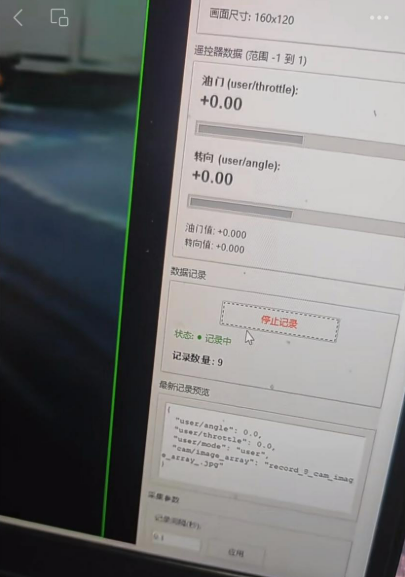
后续争取实现低成本驴车方案 "输入图像,输出油门和转向":



 他的勋章
他的勋章
昊男Henry2026.04.14
mini版让更多玩家体验到驴车魅力~大赞!
sky0072026.04.15
感谢驴车社区主理人鼓励 ;)