
 返回首页
返回首页
 回到顶部
回到顶部

【C4002 毫米波雷达】物联网开发
本文介绍了 DFRobot C4002 毫米波雷达模块结合 ESP32-C6 开发板,实现雷达数据 MQTT 上传至云端物联网平台的项目设计,包括硬件连接、流程图、代码、效果演示等。
项目介绍
DFRobot C4002 毫米波雷达模块结合 ESP32-C6 实现雷达数据的物联网云端上传与显示。
准备工作:硬件连接、环境搭建、MicroPython固件、扩展板等;
工程测试:流程图、工程代码、效果演示等;
物联网:MQTT 服务器配置、Topic 订阅、面板设计等。
硬件连接
C4002 雷达模块与 ESP32-C6 开发板的接线方式如下
| C4002 | ESP32-C6 | Note |
|---|---|---|
| RX | GPIO5 (TX) | Receive |
| TX | GPIO4 (RX) | Transmit |
| Out | GPIO7 | Outpin |
| GND | GND | Ground |
| VIN | 3V3 | Power |
实物图
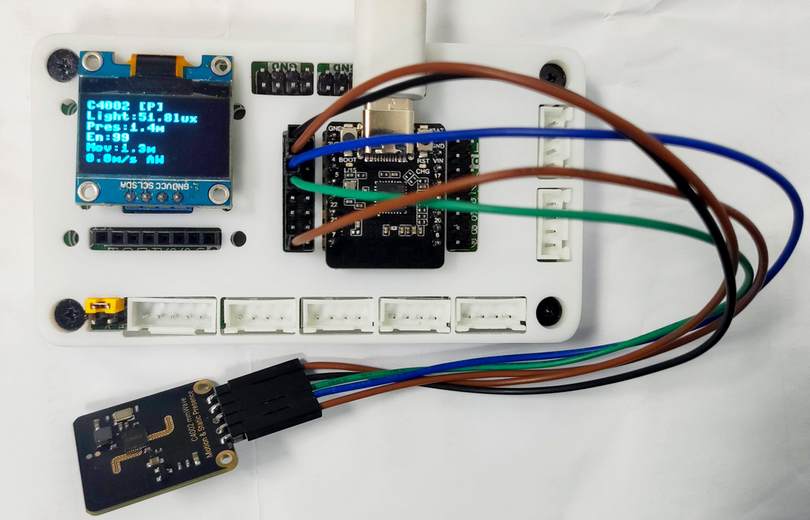
详见:DFROBOT DFR1117 Beetle ESP32-C6 产品资料 使用教程 .
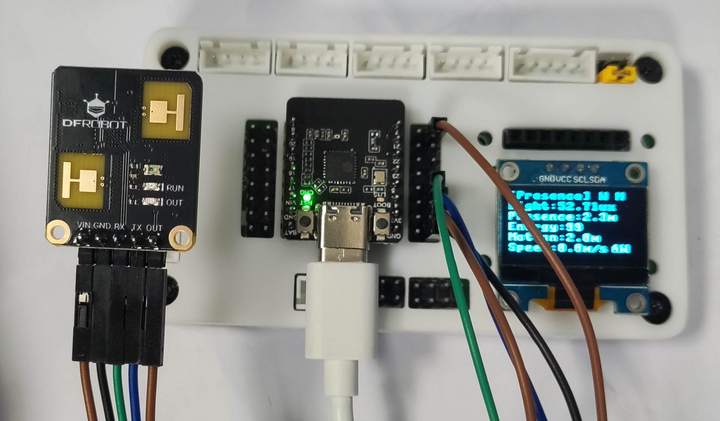
扩展板详见:【Beetle ESP32-C6开发板】扩展板设计- Makelog(造物记) .
流程图

工程代码
运行 Thonny IDE 新建文件,添加如下代码
代码见附件。
保存代码。
效果演示
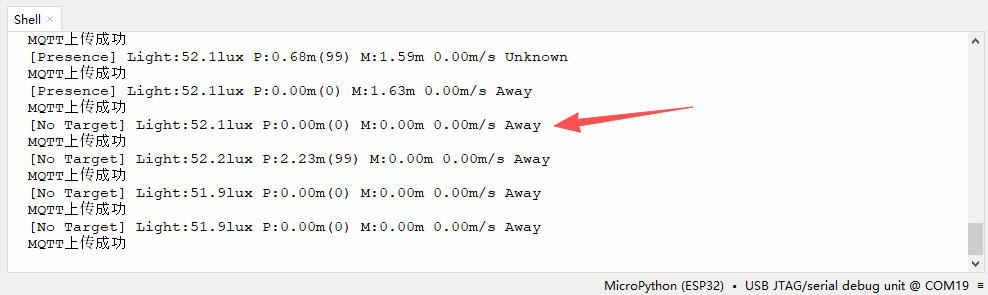
运行程序,Shell 终端输出数据采集结果;
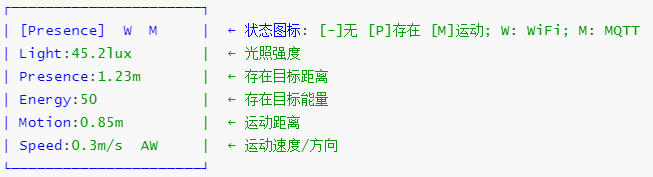
OLED 显示
OLED 显示联网状态、MQTT 状态、数据采集结果等;
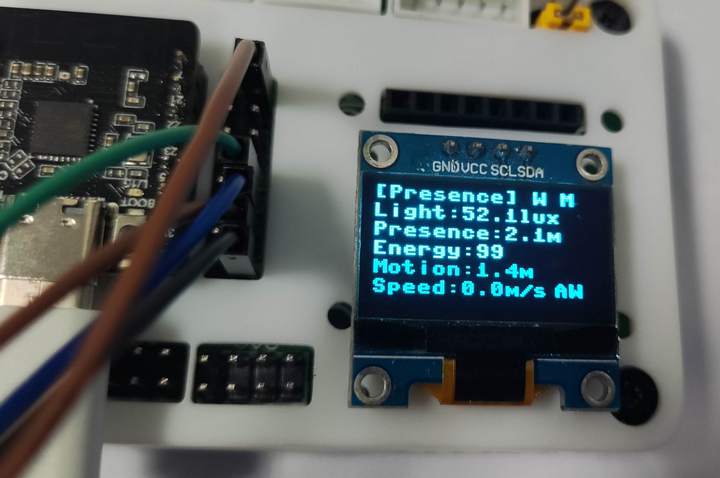
OLED 面板的各个字段的含义如下
物联网
物联网 IoT 云端平台使用 KZone喵星球 ;
打开物联网 IoT 服务器平台 https://kzone2.kittenbot.cn/iot-studio
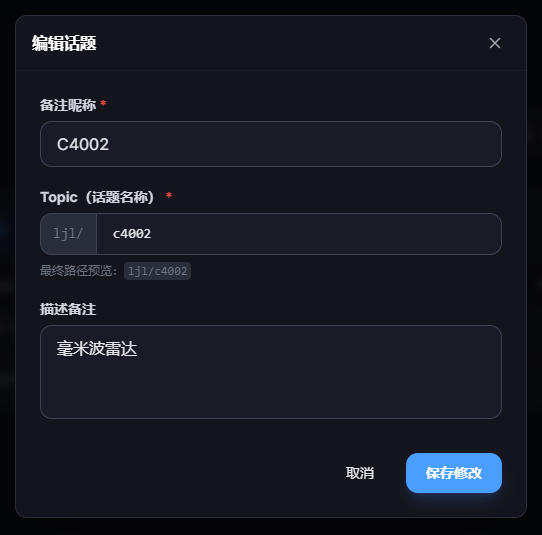
进入 话题中心 模块,新建话题;
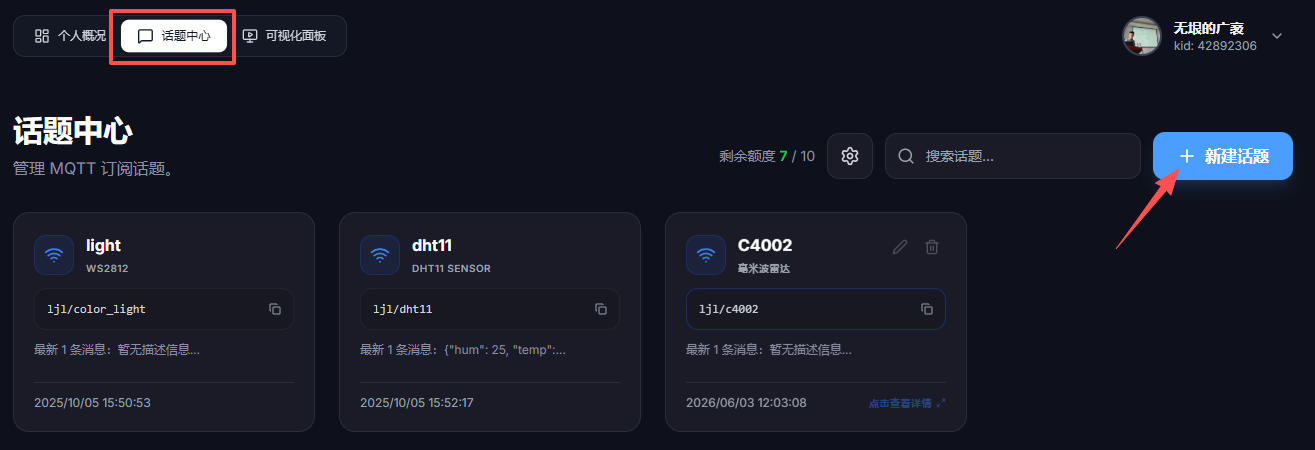
编辑话题,包括 ID、Topic、描述备注等;
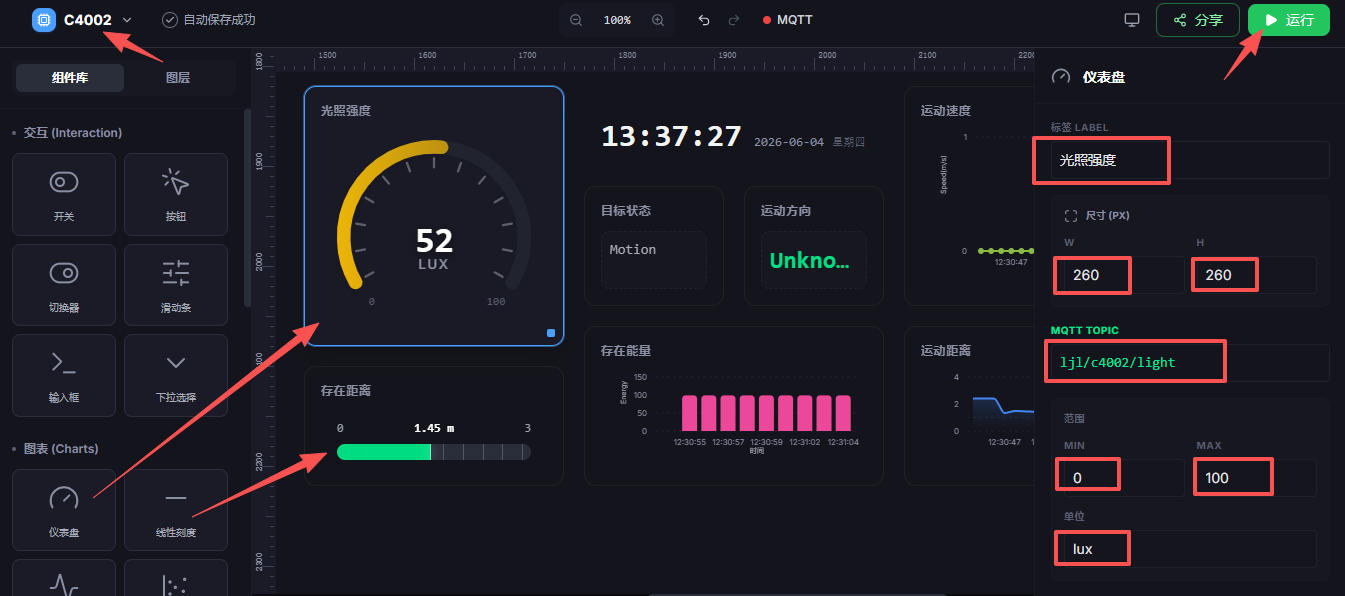
进入 可视化面板 标签页,点击右上角 新建项目 按钮;
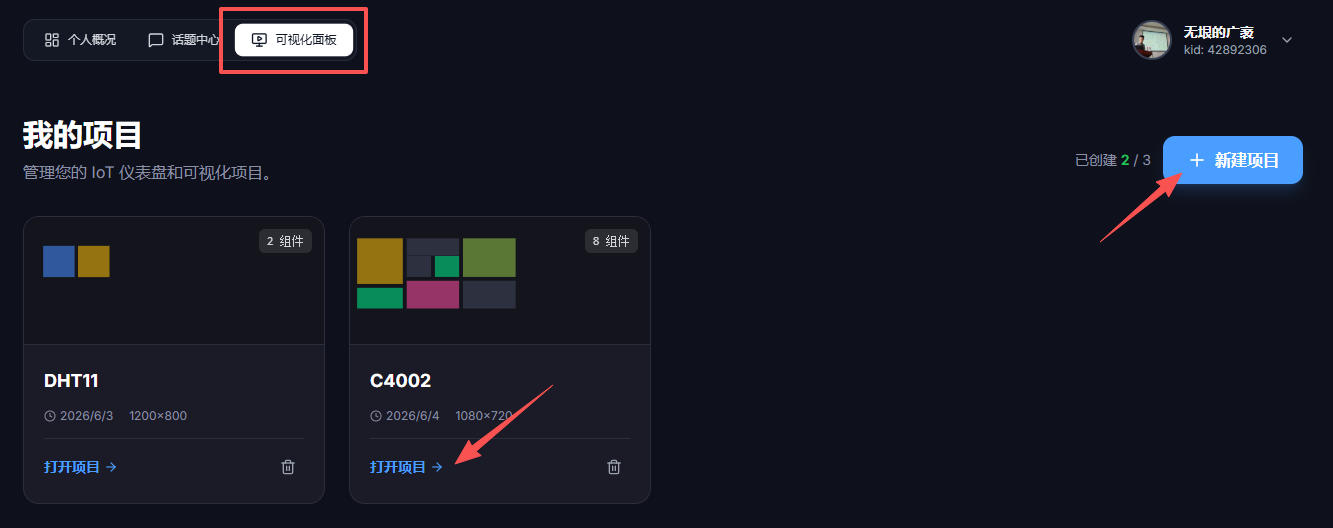
创建空白面板,在组件库中找到图表下的仪表盘图标,拖拽至主面板,并配置参数,点击 运行 按钮;
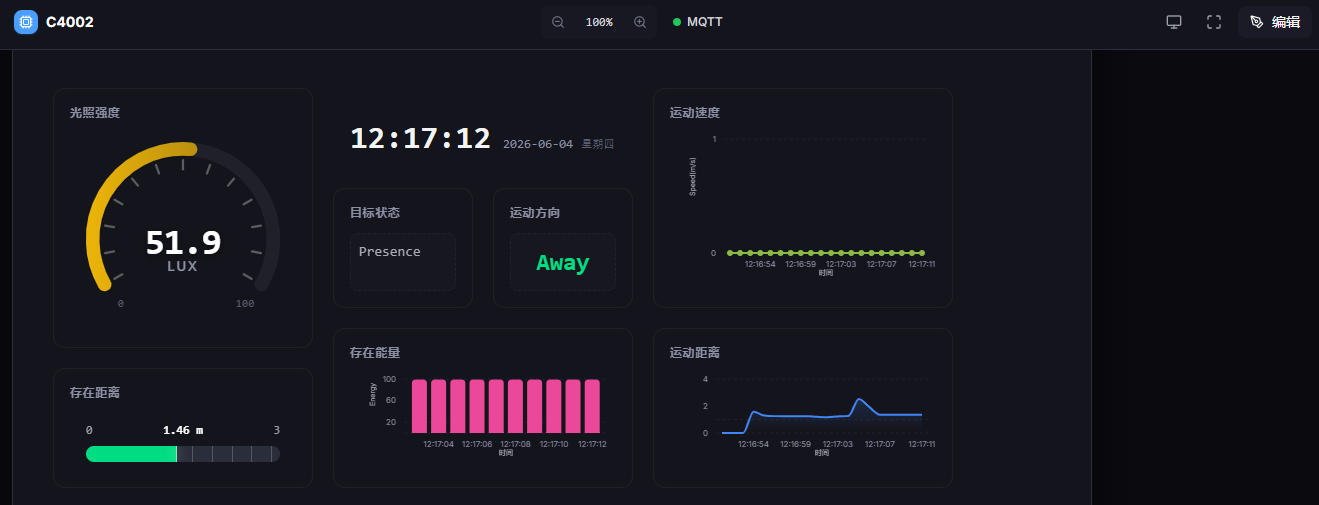
接收到 ESP32-C6 上传的各项雷达数据,面板实时更新;
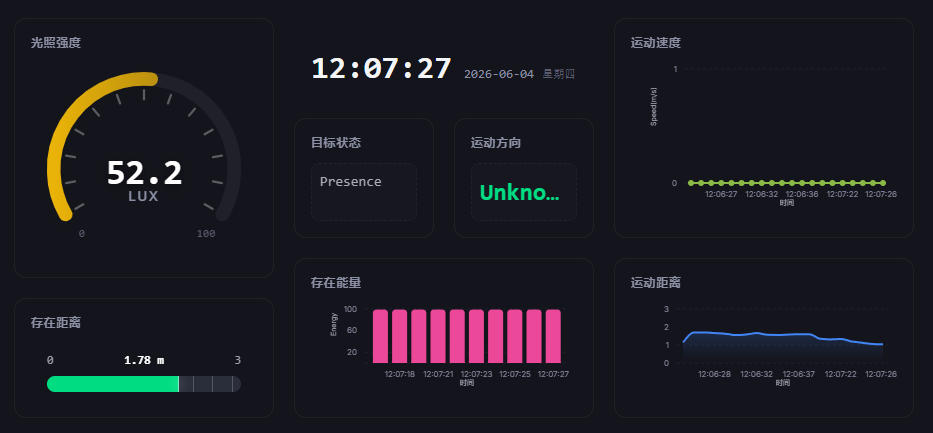
雷达数据动态更新;
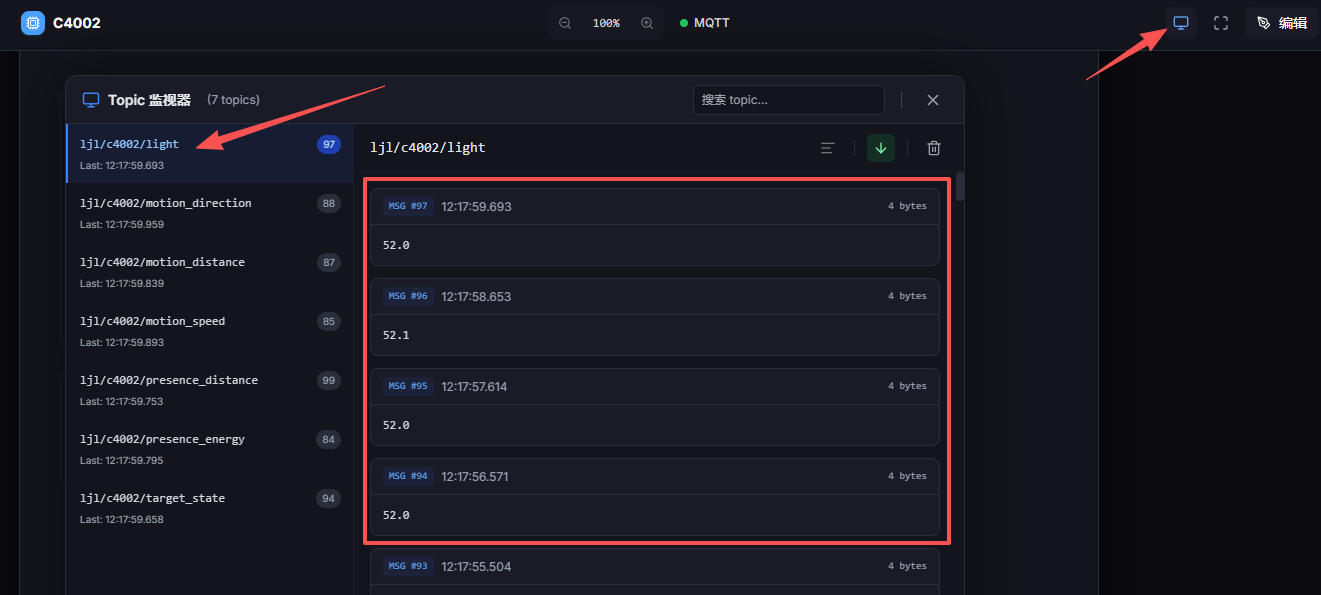
点击右上角的显示器按钮,打开 话题监视器 ,即可获取文本消息内容;
总结
本文介绍了 DFRobot C4002 毫米波雷达模块结合 ESP32-C6 开发板,实现雷达数据 MQTT 上传至云端物联网平台的项目设计,包括硬件连接、流程图、代码、效果演示等,为相关产品的快速开发和应用设计提供了参考。
from dfrobot_c4002 import (
    DFRobot_C4002,
    NoteType,
    MotionDirection,
    TargetState
)
from machine import Pin, I2C
from ssd1306 import SSD1306_I2C
import time
import network
from umqtt.simple import MQTTClient

# ========== 配置信息 ===========
# WiFi 信息
WIFI_SSID = "xxx"
WIFI_PASSWORD = "xxx"

# 小猫物联网平台 MQTT 配置
MQTT_CLIENT_ID = "c4002"
MQTT_BROKER = "iot.kittenbot.cn"
MQTT_PORT = 1883

# 发布主题
TOPIC_TARGET_STATE   = "ljl/c4002/target_state"
TOPIC_LIGHT          = "ljl/c4002/light"
TOPIC_PRESENCE_DIST  = "ljl/c4002/presence_distance"
TOPIC_PRESENCE_EN    = "ljl/c4002/presence_energy"
TOPIC_MOTION_DIST    = "ljl/c4002/motion_distance"
TOPIC_MOTION_SPEED   = "ljl/c4002/motion_speed"
TOPIC_MOTION_DIR     = "ljl/c4002/motion_direction"

# ========== OLED 初始化 ===========
i2c = I2C(0, sda=Pin(23), scl=Pin(22), freq=400000)
oled = SSD1306_I2C(128, 64, i2c)

def display_radar_data(state, light, presence, motion, wifi_ok, mqtt_ok):
    """在OLED上显示雷达数据"""
    oled.fill(0)

    # 状态图标
    state_icons = {
        TargetState.NO_TARGET: "No Target",
        TargetState.PRESENCE:  "Presence",
        TargetState.MOTION:    "Motion"
    }
    state_str = state_icons.get(state, "Unknown")

    # 第一行:状态 + 连接状态
    wifi_icon = "W" if wifi_ok else "x"
    mqtt_icon = "M" if mqtt_ok else "x"
    oled.text(f"[{state_str}] {wifi_icon} {mqtt_icon}", 0, 0)

    # 第二行:光照
    oled.text(f"Light:{light:.1f}lux", 0, 10)

    # 第三、四行:存在目标
    if presence['distance'] > 0:
        oled.text(f"Presence:{presence['distance']:.1f}m", 0, 20)
        oled.text(f"Energy:{presence['energy']}", 0, 30)
    else:
        oled.text("Presence:--", 0, 20)

    # 第五、六行:运动目标
    dir_names = {0: "AW", 1: "--", 2: "AP"}
    dir_str = dir_names.get(motion['direction'], "??")
    if motion['distance'] > 0:
        oled.text(f"Motion:{motion['distance']:.1f}m", 0, 40)
        oled.text(f"Speed:{motion['speed']:.1f}m/s", 0, 50)
        oled.text(dir_str, 100, 50)
    else:
        oled.text("Motion:--", 0, 40)

    oled.show()

# ========== WiFi 连接 ===========
def connect_wifi():
    wlan = network.WLAN(network.STA_IF)
    wlan.active(True)
    if not wlan.isconnected():
        print("正在连接WiFi...")
        oled.fill(0)
        oled.text("Connecting WiFi...", 0, 25)
        oled.show()
        wlan.connect(WIFI_SSID, WIFI_PASSWORD)
        while not wlan.isconnected():
            time.sleep(0.5)
    print("WiFi连接成功!IP:", wlan.ifconfig()[0])
    return True

# ========== MQTT 连接 ===========
def connect_mqtt():
    client = MQTTClient(MQTT_CLIENT_ID, MQTT_BROKER, port=MQTT_PORT)
    try:
        client.connect()
        print("MQTT连接小猫物联网平台成功!")
        return client
    except Exception as e:
        print("MQTT连接失败:", e)
        return None

# ========== 主程序 ===========
def main():
    wifi_ok = False
    mqtt_ok = False
    client = None

    # 初始化C4002传感器
    print("初始化C4002传感器...")
    oled.fill(0)
    oled.text("Init C4002...", 0, 25)
    oled.show()

    sensor = DFRobot_C4002(uart_id=1, baud=115200, tx_pin=5, rx_pin=4)
    while not sensor.begin():
        print("C4002 begin failed!")
        time.sleep(1)
    print("C4002初始化成功!")

    # 设置上报周期为1秒
    sensor.set_report_period(10)

    # 连接WiFi
    wifi_ok = connect_wifi()

    # 连接MQTT
    client = connect_mqtt()
    mqtt_ok = (client is not None)

    # 状态名称映射
    state_names = {
        TargetState.NO_TARGET: "No Target",
        TargetState.PRESENCE:  "Presence",
        TargetState.MOTION:    "Motion"
    }
    dir_names = {
        MotionDirection.AWAY:        "Away",
        MotionDirection.NO_DIRECTION:"Stationary",
        MotionDirection.APPROACHING: "Approaching"
    }

    print("开始上传雷达数据...")

    while True:
        try:
            # 获取通知数据
            note = sensor.get_note_info()

            if note['note_type'] == NoteType.RESULT:
                # 读取各项数据
                target_state = sensor.get_target_state()
                light = sensor.get_light_intensity()
                presence = sensor.get_presence_target_info()
                motion = sensor.get_motion_target_info()

                state_str = state_names.get(target_state, "Unknown")
                dir_str = dir_names.get(motion['direction'], "Unknown")

                # 串口打印
                print(f"[{state_str}] Light:{light:.1f}lux "
                      f"P:{presence['distance']:.2f}m({presence['energy']}) "
                      f"M:{motion['distance']:.2f}m {motion['speed']:.2f}m/s {dir_str}")

                # OLED显示
                display_radar_data(target_state, light, presence, motion, wifi_ok, mqtt_ok)

                # MQTT发布
                if client:
                    client.publish(TOPIC_TARGET_STATE, state_str)
                    client.publish(TOPIC_LIGHT, f"{light:.1f}")
                    client.publish(TOPIC_PRESENCE_DIST, f"{presence['distance']:.2f}")
                    client.publish(TOPIC_PRESENCE_EN, str(presence['energy']))
                    client.publish(TOPIC_MOTION_DIST, f"{motion['distance']:.2f}")
                    client.publish(TOPIC_MOTION_SPEED, f"{motion['speed']:.2f}")
                    client.publish(TOPIC_MOTION_DIR, dir_str)
                    print("MQTT上传成功")

            elif note['note_type'] == NoteType.CALIBRATION:
                oled.fill(0)
                oled.text("Calibrating...", 0, 25)
                oled.text(f"{note['calib_countdown']}s", 40, 40)
                oled.show()
                print(f"环境校准中... {note['calib_countdown']}s")

        except OSError as e:
            print(f"传感器错误: {e},重新初始化...")
            sensor = DFRobot_C4002(uart_id=1, baud=115200, tx_pin=4, rx_pin=5)
            while not sensor.begin():
                time.sleep(1)
            sensor.set_report_period(10)

        except Exception as e:
            print(f"MQTT错误: {e},重新连接...")
            client = connect_mqtt()
            mqtt_ok = (client is not None)

        time.sleep(1)

# 运行主程序
if __name__ == "__main__":
    main()


 他的勋章
他的勋章
评论