
 返回首页
返回首页
 回到顶部
回到顶部

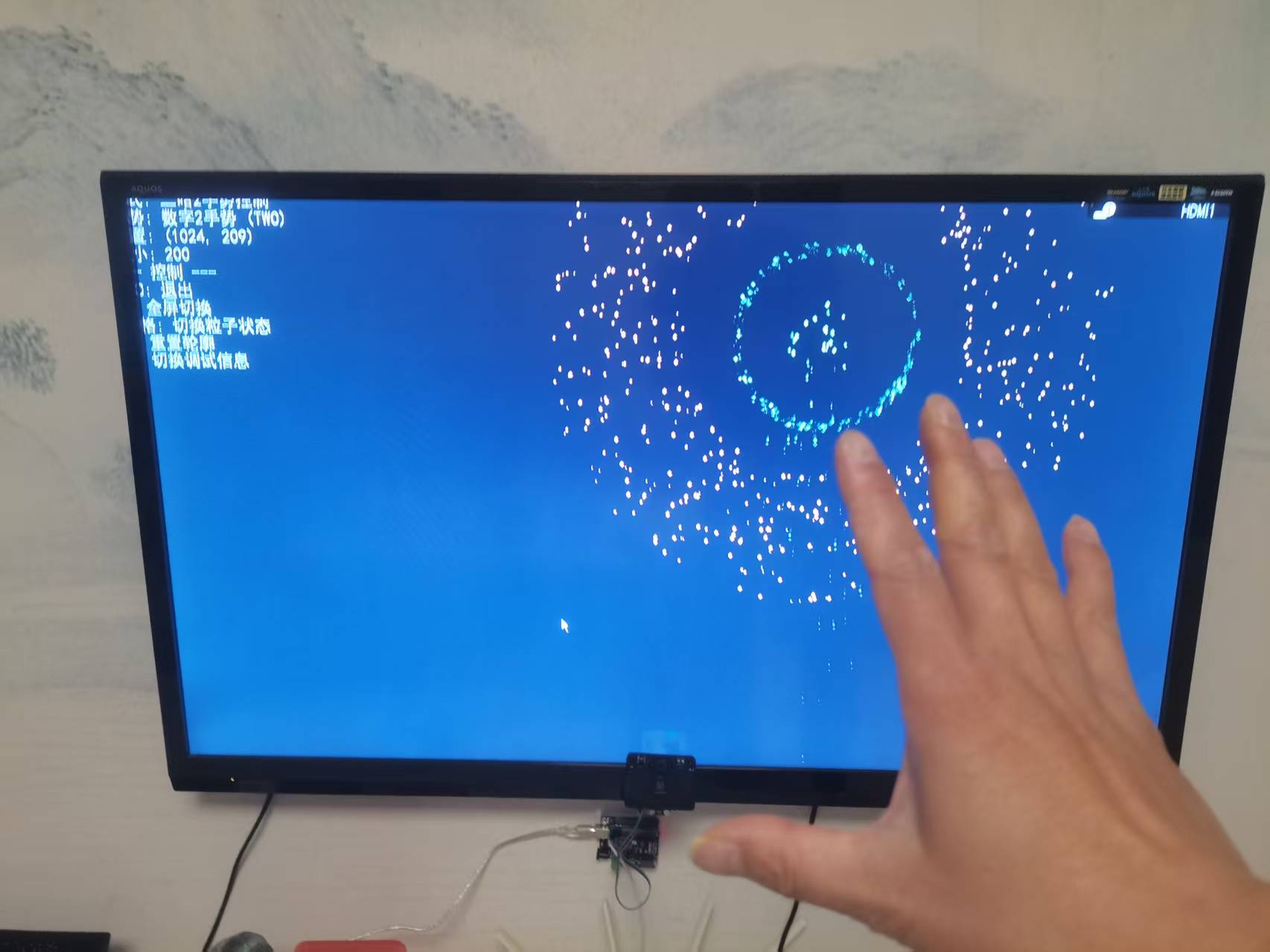
一、项目背景与目标
在人机交互技术快速发展的当下,手势与姿态识别结合视觉传感器的交互方式成为研究热点。本项目旨在借助 Deepseek 的代码生成能力,实现从电脑摄像头的手势 / 姿态识别到 DF 二哈视觉传感器结合 Arduino 的硬件交互,最终完成对粒子效果的智能控制。具体目标为:首先通过电脑摄像头和 MediaPipe 实现手势控制粒子球的聚合与散开,再拓展至姿态识别控制,最后利用 DF 二哈视觉传感器采集信息,经 Arduino 串口通信传输至电脑,实现硬件驱动的粒子效果调控。
二、前期准备:环境搭建与工具选型
- 软件环境:Python 3.8 及以上版本,安装 OpenCV(用于图像采集与处理)、MediaPipe(用于手势 / 姿态识别)、Pygame(用于粒子效果绘制)、PySerial(用于串口通信)等库;Mind+2.0(用于 Arduino UNO 程序编写与烧录)。
- pip install pygame opencv-python mediapipe numpy
- 硬件设备:电脑(带摄像头)、Arduino Uno 开发板、DF 二哈视觉传感器2.0、USB 数据线(用于 Arduino UNO与电脑通信)、4P传感器连接线(传感器与 Arduino 连接)。
- AI 工具:Deepseek 大模型,用于代码生成、调试与优化建议提供。
三、电脑摄像头手势控制粒子效果的实现
(一)Deepseek 代码生成与初始调试
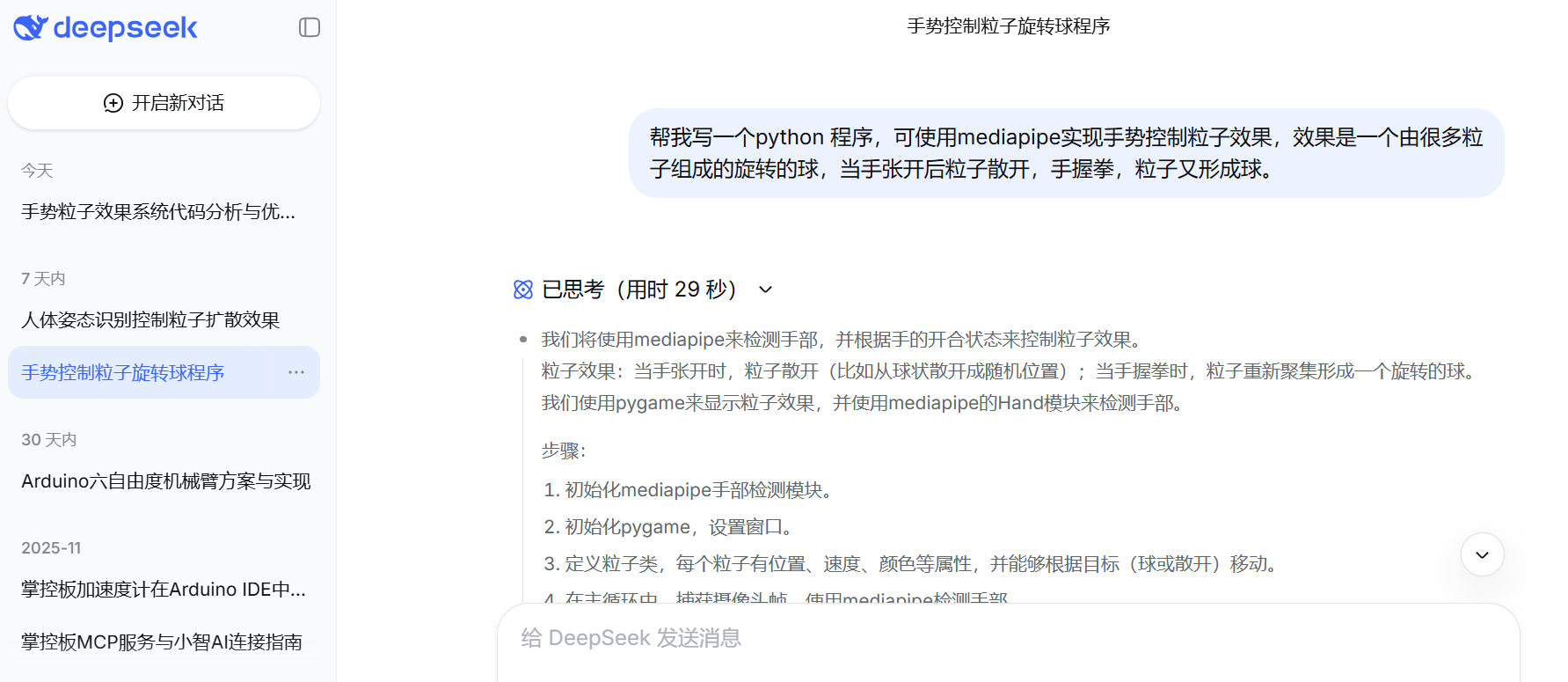
向 Deepseek 输入提示语:“帮我写一个 python 程序,可使用 mediapipe 实现手势控制粒子效果,效果是一个由很多粒子组成的旋转的球,当手张开后粒子散开,手握拳,粒子又形成球。”,Deepseek 生成了基于 Pygame 和 MediaPipe Hands 的初始代码,核心分为粒子类定义、手势识别模块、粒子效果绘制与交互逻辑三部分。

import pygame
import cv2
import mediapipe as mp
import numpy as np
import math
import random
from enum import Enum

# 初始化Pygame
pygame.init()

# 屏幕尺寸
WIDTH, HEIGHT = 1200, 800
screen = pygame.display.set_mode((WIDTH, HEIGHT))
pygame.display.set_caption("手势控制粒子效果 - 张开手散开粒子,握拳聚集粒子")

# 粒子类
class Particle:
    def __init__(self):
        self.reset_to_ball()

    def reset_to_ball(self):
        # 球形初始位置
        self.radius = random.uniform(100, 200)  # 球体半径
        self.theta = random.uniform(0, 2 * math.pi)  # 方位角
        self.phi = random.uniform(0, math.pi)  # 极角

        # 计算球面上的初始位置
        self.x = WIDTH // 2 + self.radius * math.sin(self.phi) * math.cos(self.theta)
        self.y = HEIGHT // 2 + self.radius * math.sin(self.phi) * math.sin(self.theta)
        self.z = self.radius * math.cos(self.phi)

        # 目标位置(用于平滑移动)
        self.target_x = self.x
        self.target_y = self.y
        self.target_z = self.z

        # 速度和颜色
        self.speed = random.uniform(0.02, 0.05)
        self.color = (
            random.randint(100, 255),
            random.randint(100, 255),
            random.randint(100, 255)
        )
        self.size = random.uniform(2, 5)

        # 球体旋转参数
        self.rotation_speed = random.uniform(0.002, 0.005)

    def reset_to_scattered(self):
        # 随机散开位置
        self.target_x = random.uniform(0, WIDTH)
        self.target_y = random.uniform(0, HEIGHT)
        self.target_z = random.uniform(-100, 100)
        self.x = random.uniform(0, WIDTH)
        self.y = random.uniform(0, HEIGHT)
        self.z = random.uniform(-100, 100)

    def update_ball(self, time, center_x, center_y, rotation_speed_factor):
        # 更新球体上的位置
        self.theta += self.rotation_speed * rotation_speed_factor
        self.phi += self.speed * 0.1

        # 保持角度在合理范围内
        if self.theta > 2 * math.pi:
            self.theta -= 2 * math.pi
        if self.phi > 2 * math.pi:
            self.phi -= 2 * math.pi

        # 计算球面上的目标位置
        self.target_x = center_x + self.radius * math.sin(self.phi) * math.cos(self.theta + time * 0.001)
        self.target_y = center_y + self.radius * math.sin(self.phi) * math.sin(self.theta + time * 0.001)
        self.target_z = self.radius * math.cos(self.phi + time * 0.0005)

        # 平滑移动到目标位置
        self.x += (self.target_x - self.x) * 0.1
        self.y += (self.target_y - self.y) * 0.1
        self.z += (self.target_z - self.z) * 0.1

    def update_scattered(self):
        # 平滑移动到随机散开位置
        self.x += (self.target_x - self.x) * 0.02
        self.y += (self.target_y - self.y) * 0.02
        self.z += (self.target_z - self.z) * 0.02

    def draw(self, surface):
        # 计算粒子大小(根据Z坐标调整,实现透视效果)
        perspective = max(0.3, min(1.0, (self.z + 300) / 400))
        draw_size = max(1, int(self.size * perspective))

        # 计算粒子颜色(根据Z坐标调整亮度)
        color_factor = max(0.3, min(1.0, (self.z + 200) / 300))
        draw_color = (
            min(255, int(self.color[0] * color_factor)),
            min(255, int(self.color[1] * color_factor)),
            min(255, int(self.color[2] * color_factor))
        )

        # 绘制粒子
        pygame.draw.circle(surface, draw_color, (int(self.x), int(self.y)), draw_size)

        # 为一些粒子添加发光效果
        if draw_size > 2:
            glow_color = (
                min(255, draw_color[0] + 50),
                min(255, draw_color[1] + 50),
                min(255, draw_color[2] + 50)
            )
            pygame.draw.circle(surface, glow_color, (int(self.x), int(self.y)), draw_size // 2)

# 手势状态枚举
class HandState(Enum):
    OPEN = 1
    CLOSED = 2
    UNKNOWN = 3

# 手势识别类
class HandGestureRecognizer:
    def __init__(self):
        self.mp_hands = mp.solutions.hands
        self.hands = self.mp_hands.Hands(
            static_image_mode=False,
            max_num_hands=1,
            min_detection_confidence=0.7,
            min_tracking_confidence=0.5
        )
        self.mp_draw = mp.solutions.drawing_utils

        # 打开摄像头
        self.cap = cv2.VideoCapture(0)
        self.cap.set(cv2.CAP_PROP_FRAME_WIDTH, 640)
        self.cap.set(cv2.CAP_PROP_FRAME_HEIGHT, 480)

        # 手势状态
        self.hand_state = HandState.UNKNOWN
        self.hand_landmarks = None
        self.hand_center = (0, 0)

    def recognize_gesture(self, landmarks):
        """识别手势状态(张开或握拳)"""
        # 获取关键点坐标
        wrist = landmarks.landmark[self.mp_hands.HandLandmark.WRIST]
        thumb_tip = landmarks.landmark[self.mp_hands.HandLandmark.THUMB_TIP]
        index_tip = landmarks.landmark[self.mp_hands.HandLandmark.INDEX_FINGER_TIP]
        middle_tip = landmarks.landmark[self.mp_hands.HandLandmark.MIDDLE_FINGER_TIP]
        ring_tip = landmarks.landmark[self.mp_hands.HandLandmark.RING_FINGER_TIP]
        pinky_tip = landmarks.landmark[self.mp_hands.HandLandmark.PINKY_TIP]

        # 计算指尖到手腕的距离
        def distance(p1, p2):
            return math.sqrt((p1.x - p2.x)**2 + (p1.y - p2.y)**2)

        thumb_dist = distance(thumb_tip, wrist)
        index_dist = distance(index_tip, wrist)
        middle_dist = distance(middle_tip, wrist)
        ring_dist = distance(ring_tip, wrist)
        pinky_dist = distance(pinky_tip, wrist)

        # 计算平均距离
        avg_dist = (thumb_dist + index_dist + middle_dist + ring_dist + pinky_dist) / 5

        # 设置阈值判断手势
        if avg_dist > 0.25:  # 张开手
            return HandState.OPEN
        else:  # 握拳
            return HandState.CLOSED

    def update(self):
        """更新手势识别"""
        success, frame = self.cap.read()
        if not success:
            return False

        # 翻转帧以获得镜像效果
        frame = cv2.flip(frame, 1)

        # 转换为RGB
        frame_rgb = cv2.cvtColor(frame, cv2.COLOR_BGR2RGB)

        # 处理手势
        results = self.hands.process(frame_rgb)

        if results.multi_hand_landmarks:
            self.hand_landmarks = results.multi_hand_landmarks[0]
            self.hand_state = self.recognize_gesture(self.hand_landmarks)

            # 计算手部中心点(用于控制粒子球中心)
            wrist = self.hand_landmarks.landmark[self.mp_hands.HandLandmark.WRIST]
            # 将坐标映射到屏幕
            self.hand_center = (
                int((1 - wrist.x) * WIDTH),  # 镜像翻转
                int(wrist.y * HEIGHT)
            )
        else:
            self.hand_landmarks = None
            self.hand_state = HandState.UNKNOWN

        return True

    def draw_hand_overlay(self, surface):
        """在Pygame表面上绘制手部关键点"""
        if self.hand_landmarks:
            # 绘制关键点
            for landmark in self.hand_landmarks.landmark:
                x = int((1 - landmark.x) * WIDTH)  # 镜像翻转
                y = int(landmark.y * HEIGHT)
                pygame.draw.circle(surface, (0, 255, 0), (x, y), 5)

            # 绘制连接线
            connections = self.mp_hands.HAND_CONNECTIONS
            for connection in connections:
                start = self.hand_landmarks.landmark[connection[0]]
                end = self.hand_landmarks.landmark[connection[1]]

                start_pos = (int((1 - start.x) * WIDTH), int(start.y * HEIGHT))
                end_pos = (int((1 - end.x) * WIDTH), int(end.y * HEIGHT))

                pygame.draw.line(surface, (255, 255, 255), start_pos, end_pos, 2)

            # 绘制手势状态指示器
            state_text = "张开手" if self.hand_state == HandState.OPEN else "握拳"
            state_color = (0, 255, 0) if self.hand_state == HandState.OPEN else (255, 0, 0)

            font = pygame.font.SysFont(None, 36)
            text = font.render(f"手势: {state_text}", True, state_color)
            surface.blit(text, (self.hand_center[0] - 50, self.hand_center[1] - 40))

    def release(self):
        """释放资源"""
        self.cap.release()
        self.hands.close()

# 创建粒子系统
class ParticleSystem:
    def __init__(self, num_particles=300):
        self.particles = [Particle() for _ in range(num_particles)]
        self.state = "ball"  # 初始状态为球体
        self.transition_progress = 0  # 过渡进度
        self.transition_speed = 0.02  # 过渡速度

    def update(self, hand_state, hand_center, time):
        # 根据手势状态确定目标状态
        target_state = "scattered" if hand_state == HandState.OPEN else "ball"

        # 如果状态变化,开始过渡
        if self.state != target_state:
            self.transition_progress += self.transition_speed
            if self.transition_progress >= 1:
                self.state = target_state
                self.transition_progress = 0

                # 如果完全过渡到散开状态,重置粒子位置
                if self.state == "scattered":
                    for particle in self.particles:
                        particle.reset_to_scattered()

        # 更新粒子
        for particle in self.particles:
            if self.state == "ball" and target_state == "ball":
                # 球体状态
                rotation_factor = 1.0 if hand_state == HandState.CLOSED else 0.3
                particle.update_ball(time, hand_center[0], hand_center[1], rotation_factor)
            elif self.state == "scattered" and target_state == "scattered":
                # 散开状态
                particle.update_scattered()
            else:
                # 过渡状态:混合两种状态
                if target_state == "scattered":
                    # 从球体过渡到散开
                    particle.update_ball(time, hand_center[0], hand_center[1], 0.5)

                    # 混合目标位置
                    scatter_x = particle.x + (particle.target_x - particle.x) * self.transition_progress
                    scatter_y = particle.y + (particle.target_y - particle.y) * self.transition_progress
                    scatter_z = particle.z + (particle.target_z - particle.z) * self.transition_progress

                    particle.x += (scatter_x - particle.x) * 0.1
                    particle.y += (scatter_y - particle.y) * 0.1
                    particle.z += (scatter_z - particle.z) * 0.1
                else:
                    # 从散开过渡到球体
                    particle.update_scattered()

                    # 计算球体上的目标位置
                    center_x = hand_center[0]
                    center_y = hand_center[1]

                    # 混合目标位置
                    ball_x = particle.x + (center_x - particle.x) * self.transition_progress
                    ball_y = particle.y + (center_y - particle.y) * self.transition_progress

                    particle.x += (ball_x - particle.x) * 0.1
                    particle.y += (ball_y - particle.y) * 0.1

    def draw(self, surface):
        # 绘制所有粒子
        for particle in self.particles:
            particle.draw(surface)

# 主程序
def main():
    # 创建手势识别器
    recognizer = HandGestureRecognizer()

    # 创建粒子系统
    particle_system = ParticleSystem(num_particles=400)

    # 创建时钟对象
    clock = pygame.time.Clock()

    # 主循环
    running = True
    time = 0

    # 手部中心默认位置(屏幕中心)
    hand_center = (WIDTH // 2, HEIGHT // 2)

    while running:
        # 处理事件
        for event in pygame.event.get():
            if event.type == pygame.QUIT:
                running = False
            elif event.type == pygame.KEYDOWN:
                if event.key == pygame.K_ESCAPE:
                    running = False

        # 更新手势识别
        if not recognizer.update():
            print("无法读取摄像头")
            running = False
            continue

        # 获取手势状态
        hand_state = recognizer.hand_state
        if recognizer.hand_center != (0, 0):
            hand_center = recognizer.hand_center

        # 更新时间
        time += 1

        # 清屏
        screen.fill((0, 0, 0))

        # 更新粒子系统
        particle_system.update(hand_state, hand_center, time)

        # 绘制粒子
        particle_system.draw(screen)

        # 绘制手部关键点
        recognizer.draw_hand_overlay(screen)

        # 绘制说明文本
        font = pygame.font.SysFont(None, 36)
        instructions = [
            "手势控制粒子效果",
            "张开手:粒子散开",
            "握拳:粒子聚集成旋转球体",
            "按ESC退出"
        ]

        for i, text in enumerate(instructions):
            text_surface = font.render(text, True, (255, 255, 255))
            screen.blit(text_surface, (10, 10 + i * 40))

        # 显示状态
        state_text = "散开" if hand_state == HandState.OPEN else "聚集" if hand_state == HandState.CLOSED else "未检测到手"
        state_color = (255, 100, 100) if hand_state == HandState.OPEN else (100, 255, 100) if hand_state == HandState.CLOSED else (150, 150, 150)

        state_surface = font.render(f"状态: {state_text}", True, state_color)
        screen.blit(state_surface, (WIDTH - 200, 10))

        # 更新显示
        pygame.display.flip()

        # 控制帧率
        clock.tick(60)

    # 释放资源
    recognizer.release()
    pygame.quit()

if __name__ == "__main__":
    main()
运行效果

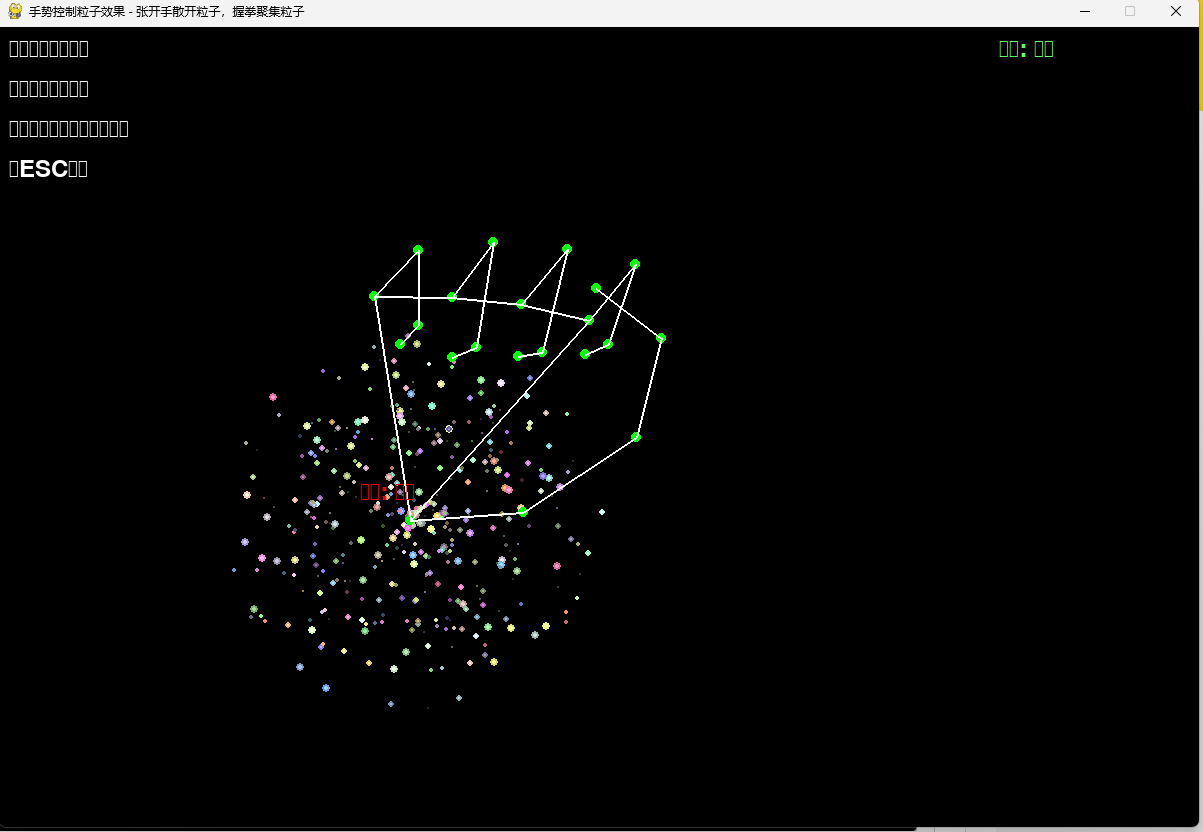
初始运行时出现了几个问题:
一是球跟随掌跟移动,我想让其跟随掌心移动;二是手张开,粒子没有扩散的过程;三是没有实现全屏显示;四是要中文未正常显示;五是程序出现手势在摄像头近大远小,使得远处的手势张开也识别成握拳,近处的手势握拳识别成张开;六是摄像头画面镜像问题,手向左移时,画面中的手势向右移。
(二)Deepseek 代码优化与调试
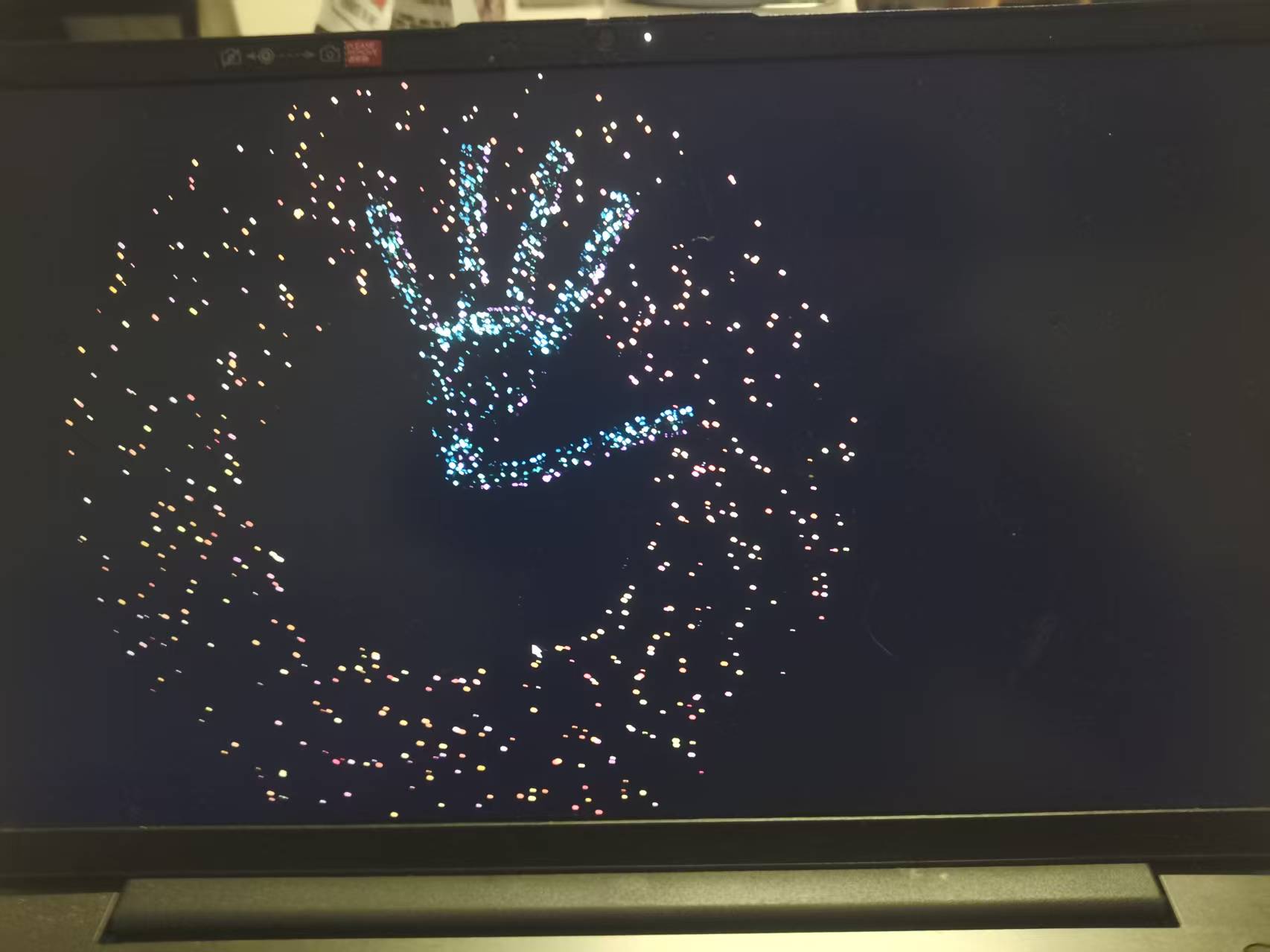
将问题反馈给 Deepseek,要求优化。并提出:用粒子勾勒出手指和手掌的轮廓,零星粒子是从手部上掉落下来。
Deepseek给出以下程序。
import pygame
import cv2
import mediapipe as mp
import numpy as np
import math
import random
# 初始化Pygame
pygame.init()
# 全局变量声明
global WIDTH, HEIGHT, screen
# 初始窗口设置
WIDTH, HEIGHT = 1200, 800
screen = pygame.display.set_mode((0, 0), pygame.FULLSCREEN)
pygame.display.set_caption("手势粒子效果 - 宽轮廓多源坠落")
# 球体粒子颜色配置
class SphereColors:
@staticmethod
def get_color():
"""球体粒子颜色 - 暖色调"""
color_type = random.choice(['red', 'orange', 'yellow', 'pink'])
if color_type == 'red':
return (255, random.randint(50, 150), random.randint(50, 100))
elif color_type == 'orange':
return (255, random.randint(150, 200), random.randint(50, 100))
elif color_type == 'yellow':
return (255, 255, random.randint(100, 200))
else: # pink
return (255, random.randint(100, 200), random.randint(150, 255))
# 轮廓粒子颜色配置
class ContourColors:
@staticmethod
def get_color(layer_index, total_layers):
"""轮廓粒子颜色 - 冷色调渐变"""
# 从蓝到紫的渐变
ratio = layer_index / total_layers
if ratio < 0.33: # 内层: 亮蓝色
return (100, 200 + int(55 * ratio), 255)
elif ratio < 0.66: # 中层: 青色
return (100, 255, 200 + int(55 * (1 - ratio)))
else: # 外层: 紫色
return (150 + int(105 * ratio), 100, 255)
# 坠落粒子颜色配置
class FallingColors:
@staticmethod
def get_color():
"""坠落粒子颜色 - 亮色"""
color_type = random.choice(['cyan', 'light_blue', 'light_purple', 'white', 'light_green'])
if color_type == 'cyan':
return (random.randint(150, 200), 255, 255)
elif color_type == 'light_blue':
return (random.randint(150, 200), random.randint(200, 255), 255)
elif color_type == 'light_purple':
return (random.randint(200, 255), random.randint(150, 200), 255)
elif color_type == 'white':
return (255, 255, 255)
else: # light_green
return (random.randint(150, 200), 255, random.randint(150, 200))
# 粒子基类
class Particle:
def __init__(self, x, y, z=0):
self.x = x
self.y = y
self.z = z
self.vx = 0
self.vy = 0
self.vz = 0
self.size = random.uniform(1.5, 4)
self.lifetime = random.uniform(1.0, 3.0)
self.max_lifetime = self.lifetime
def update_lifetime(self, dt):
self.lifetime -= dt
return self.lifetime > 0
def get_alpha(self):
return max(0.1, min(1.0, self.lifetime / self.max_lifetime))
def draw(self, surface):
alpha = self.get_alpha()
draw_size = max(1, int(self.size * alpha))
# 应用透明度
if hasattr(self, 'color'):
r, g, b = self.color
draw_color = (int(r * alpha), int(g * alpha), int(b * alpha))
else:
draw_color = (255, 255, 255)
pygame.draw.circle(surface, draw_color, (int(self.x), int(self.y)), draw_size)
# 球体粒子
class SphereParticle(Particle):
def __init__(self, x, y, z):
super().__init__(x, y, z)
self.color = SphereColors.get_color()
self.theta = random.uniform(0, 2 * math.pi)
self.phi = random.uniform(0, math.pi)
self.rotation_speed = random.uniform(0.002, 0.005)
self.scatter_angle = random.uniform(0, 2 * math.pi)
self.scatter_distance = random.uniform(300, 600)
def update_ball(self, center_x, center_y, ball_radius, rotation_factor):
self.theta += self.rotation_speed * rotation_factor
self.phi += self.rotation_speed * 0.5
self.theta %= 2 * math.pi
self.target_x = center_x + ball_radius * math.sin(self.phi) * math.cos(self.theta)
self.target_y = center_y + ball_radius * math.sin(self.phi) * math.sin(self.theta)
# 平滑移动
dx = self.target_x - self.x
dy = self.target_y - self.y
self.x += dx * 0.1
self.y += dy * 0.1
def update_scatter(self, center_x, center_y, progress):
if progress < 0.01:
return
current_distance = self.scatter_distance * progress
angle = self.scatter_angle + progress * 2
target_x = center_x + math.cos(angle) * current_distance
target_y = center_y + math.sin(angle) * current_distance
dx = target_x - self.x
dy = target_y - self.y
self.x += dx * 0.05
self.y += dy * 0.05
# 轮廓粒子 - 加宽版本
class ContourParticle(Particle):
def __init__(self, start_point, end_point, position_ratio, layer_index, total_layers):
super().__init__(0, 0)
self.start_point = start_point
self.end_point = end_point
self.position_ratio = position_ratio
self.layer_index = layer_index
self.total_layers = total_layers
# 颜色与球体粒子明显区分
self.color = ContourColors.get_color(layer_index, total_layers)
# 移动参数
self.speed = random.uniform(0.15, 0.35)
self.move_direction = random.choice([-1, 1])
# 轮廓粒子稍大
self.size = random.uniform(2.0, 4.5)
# 更新初始位置
self.update_contour_position()
def update_contour_position(self):
"""计算在加宽轮廓上的位置"""
dx = self.end_point[0] - self.start_point[0]
dy = self.end_point[1] - self.start_point[1]
# 基础位置(在线段上)
base_x = self.start_point[0] + dx * self.position_ratio
base_y = self.start_point[1] + dy * self.position_ratio
# 计算法线方向以创建宽度
if dx == 0 and dy == 0:
normal_x, normal_y = 0, 0
else:
length = math.sqrt(dx*dx + dy*dy)
unit_x = dx / length
unit_y = dy / length
normal_x = -unit_y
normal_y = unit_x
# 根据层索引计算宽度偏移 - 增加宽度
width_multiplier = 8 # 增加宽度系数
width_offset = (self.layer_index - self.total_layers/2) * width_multiplier
# 应用宽度偏移
offset_x = normal_x * width_offset
offset_y = normal_y * width_offset
# 添加一些随机扰动,使轮廓更自然
offset_x += random.uniform(-1.5, 1.5)
offset_y += random.uniform(-1.5, 1.5)
self.x = base_x + offset_x
self.y = base_y + offset_y
def update_contour_segment(self, new_start, new_end):
"""更新轮廓线段"""
self.start_point = new_start
self.end_point = new_end
self.update_contour_position()
def move_along_contour(self, dt):
"""沿轮廓移动"""
self.position_ratio += self.speed * self.move_direction * dt / 40
# 边界检查
if self.position_ratio >= 1.0:
self.position_ratio = 1.0
self.move_direction = -1
elif self.position_ratio <= 0.0:
self.position_ratio = 0.0
self.move_direction = 1
self.update_contour_position()
def update_position(self, dt):
self.move_along_contour(dt)
return self.update_lifetime(dt * 0.2)
# 坠落粒子 - 从多个位置掉落
class FallingParticle(Particle):
def __init__(self, start_x, start_y):
super().__init__(start_x, start_y)
# 坠落粒子颜色 - 明亮显眼
self.color = FallingColors.get_color()
# 物理参数
self.fall_speed = random.uniform(1.5, 4.0)
self.wind_force = random.uniform(-0.3, 0.3)
self.size = random.uniform(1.8, 3.5) # 稍大一些
# 初始速度
self.vx = random.uniform(-0.5, 0.5)
self.vy = random.uniform(-1.0, 0)
# 生命周期
self.lifetime = random.uniform(2.0, 6.0)
self.max_lifetime = self.lifetime
def update_fall(self, dt):
# 重力加速
self.vy += self.fall_speed * dt
self.vx += self.wind_force * dt
# 更新位置
self.x += self.vx
self.y += self.vy
# 边界检查
if self.y > HEIGHT + 50:
return False
if self.x < -50 or self.x > WIDTH + 50:
return False
return self.update_lifetime(dt)
# 手势识别
class HandTracker:
def __init__(self, width, height):
self.width = width
self.height = height
self.mp_hands = mp.solutions.hands
self.hands = self.mp_hands.Hands(
static_image_mode=False,
max_num_hands=1,
min_detection_confidence=0.7,
min_tracking_confidence=0.5
)
self.cap = cv2.VideoCapture(0)
if not self.cap.isOpened():
print("无法打开摄像头")
return
self.cap.set(cv2.CAP_PROP_FRAME_WIDTH, 640)
self.cap.set(cv2.CAP_PROP_FRAME_HEIGHT, 480)
self.hand_landmarks = None
self.contour_points = []
self.contour_segments = []
# 手部连接定义
self.hand_connections = [
(0, 1), (1, 2), (2, 3), (3, 4),
(0, 5), (5, 6), (6, 7), (7, 8),
(0, 9), (9, 10), (10, 11), (11, 12),
(0, 13), (13, 14), (14, 15), (15, 16),
(0, 17), (17, 18), (18, 19), (19, 20),
(5, 9), (9, 13), (13, 17)
]
# 所有关节点索引(用于多源坠落)
self.all_joint_indices = list(range(21))
def extract_contour_points(self, landmarks):
"""提取手部关键点"""
points = []
for i in range(21):
landmark = landmarks.landmark[i]
x = int(landmark.x * self.width)
y = int(landmark.y * self.height)
points.append((x, y))
return points
def get_contour_segments(self):
"""获取轮廓线段"""
segments = []
if len(self.contour_points) == 21:
for start_idx, end_idx in self.hand_connections:
if start_idx < 21 and end_idx < 21:
segments.append((self.contour_points[start_idx], self.contour_points[end_idx]))
return segments
def get_random_joint_position(self):
"""随机获取一个关节点位置(用于多源坠落)"""
if not self.contour_points:
return None
joint_idx = random.choice(self.all_joint_indices)
if joint_idx < len(self.contour_points):
return self.contour_points[joint_idx]
return None
def get_finger_tip_positions(self):
"""获取指尖位置"""
tips = []
tip_indices = [4, 8, 12, 16, 20]
if not self.contour_points:
return tips
for idx in tip_indices:
if idx < len(self.contour_points):
tips.append(self.contour_points[idx])
return tips
def update(self):
if not self.cap.isOpened():
return False
success, frame = self.cap.read()
if not success:
return False
# 镜像
frame = cv2.flip(frame, 1)
frame_rgb = cv2.cvtColor(frame, cv2.COLOR_BGR2RGB)
results = self.hands.process(frame_rgb)
if results.multi_hand_landmarks:
self.hand_landmarks = results.multi_hand_landmarks[0]
self.contour_points = self.extract_contour_points(self.hand_landmarks)
self.contour_segments = self.get_contour_segments()
else:
self.hand_landmarks = None
self.contour_points = []
self.contour_segments = []
return True
def release(self):
if self.cap.isOpened():
self.cap.release()
if self.hands:
self.hands.close()
# 主粒子系统
class MainParticleSystem:
def __init__(self, num_particles=500):
self.particles = []
self.num_particles = num_particles
self.state = "ball"
self.transition_progress = 0
self.transition_speed = 0.04
self.ball_radius = 150
self.center_x = WIDTH // 2
self.center_y = HEIGHT // 2
# 初始化粒子
for _ in range(num_particles):
theta = random.uniform(0, 2 * math.pi)
phi = random.uniform(0, math.pi)
x = self.center_x + self.ball_radius * math.sin(phi) * math.cos(theta)
y = self.center_y + self.ball_radius * math.sin(phi) * math.sin(theta)
z = self.ball_radius * math.cos(phi)
particle = SphereParticle(x, y, z)
self.particles.append(particle)
def update(self, hand_state, palm_center, gesture_strength):
# 更新中心位置
if palm_center:
self.center_x = palm_center[0]
self.center_y = palm_center[1]
# 状态控制
target_state = "scattered" if hand_state == "OPEN" else "ball"
# 球体半径
if hand_state == "CLOSED":
self.ball_radius = 120 + gesture_strength * 60
else:
self.ball_radius = 150
# 状态过渡
if self.state != target_state:
if target_state == "scattered":
self.transition_progress += self.transition_speed
if self.transition_progress >= 1:
self.state = "scattered"
self.transition_progress = 1
else:
self.transition_progress -= self.transition_speed
if self.transition_progress <= 0:
self.state = "ball"
self.transition_progress = 0
# 更新粒子
for particle in self.particles:
if self.state == "ball" and self.transition_progress <= 0:
particle.update_ball(self.center_x, self.center_y, self.ball_radius, 1.0)
elif self.state == "scattered" and self.transition_progress >= 1:
particle.update_scatter(self.center_x, self.center_y, 1.0)
elif target_state == "scattered":
particle.update_scatter(self.center_x, self.center_y, self.transition_progress)
def draw(self, surface):
for particle in self.particles:
particle.draw(surface)
# 手部轮廓粒子系统 - 加宽版本
class HandContourSystem:
def __init__(self):
self.contour_particles = []
self.falling_particles = []
# 轮廓参数 - 增加宽度
self.particles_per_segment = 10 # 增加密度
self.contour_width_layers = 5 # 增加层数
# 坠落粒子参数
self.max_falling_particles = 80 # 增加数量
# 坠落源概率
self.finger_tip_probability = 0.4 # 40%从指尖
self.other_joint_probability = 0.6 # 60%从其他关节点
def update(self, contour_segments, hand_tracker, dt):
# 更新轮廓粒子
self.update_contour_particles(contour_segments, dt)
# 更新坠落粒子
self.update_falling_particles(dt)
# 生成新的坠落粒子 - 多源
self.generate_falling_particles(hand_tracker)
def update_contour_particles(self, contour_segments, dt):
if not contour_segments:
self.contour_particles = []
return
# 创建或更新粒子
if len(self.contour_particles) == 0:
self.create_contour_particles(contour_segments)
else:
self.update_existing_particles(contour_segments, dt)
def create_contour_particles(self, contour_segments):
"""创建加宽轮廓粒子"""
for segment in contour_segments:
for i in range(self.particles_per_segment):
position_ratio = i / self.particles_per_segment
# 创建多层粒子形成宽度
for layer_index in range(self.contour_width_layers):
particle = ContourParticle(
segment[0], segment[1],
position_ratio,
layer_index,
self.contour_width_layers
)
self.contour_particles.append(particle)
def update_existing_particles(self, contour_segments, dt):
"""更新现有粒子"""
particles_per_segment = self.particles_per_segment * self.contour_width_layers
segment_count = len(contour_segments)
for i, particle in enumerate(self.contour_particles):
segment_idx = (i // particles_per_segment) % segment_count
if segment_idx < len(contour_segments):
segment = contour_segments[segment_idx]
particle.update_contour_segment(segment[0], segment[1])
if not particle.update_position(dt):
# 重置粒子
new_ratio = random.random()
particle.position_ratio = new_ratio
particle.lifetime = random.uniform(1.0, 3.0)
particle.max_lifetime = particle.lifetime
def generate_falling_particles(self, hand_tracker):
"""从多个位置生成坠落粒子 - 修复了start_x, start_y未定义的问题"""
if len(self.falling_particles) >= self.max_falling_particles:
return
# 初始化位置变量
start_x = None
start_y = None
# 随机决定粒子来源
if random.random() < self.finger_tip_probability:
# 从指尖生成
tips = hand_tracker.get_finger_tip_positions()
if tips and len(tips) > 0:
tip_pos = random.choice(tips)
start_x = tip_pos[0] + random.uniform(-15, 15)
start_y = tip_pos[1] - random.uniform(0, 10)
else:
# 从其他关节点生成
joint_pos = hand_tracker.get_random_joint_position()
if joint_pos:
start_x = joint_pos[0] + random.uniform(-20, 20)
start_y = joint_pos[1] + random.uniform(-10, 10)
# 如果没有获取到有效位置,则返回
if start_x is None or start_y is None:
return
# 创建坠落粒子
if random.random() < 0.4: # 控制生成频率
particle = FallingParticle(start_x, start_y)
self.falling_particles.append(particle)
def update_falling_particles(self, dt):
# 使用列表推导式移除已死亡的粒子
alive_particles = []
for particle in self.falling_particles:
if particle.update_fall(dt):
alive_particles.append(particle)
self.falling_particles = alive_particles
def draw(self, surface):
# 绘制轮廓粒子
for particle in self.contour_particles:
particle.draw(surface)
# 绘制坠落粒子
for particle in self.falling_particles:
particle.draw(surface)
# 主程序
def main():
global screen, WIDTH, HEIGHT
# 初始化
hand_tracker = HandTracker(WIDTH, HEIGHT)
if not hand_tracker.cap.isOpened():
print("无法打开摄像头,请检查摄像头连接")
pygame.quit()
return
main_particles = MainParticleSystem(num_particles=600)
hand_contour = HandContourSystem()
clock = pygame.time.Clock()
running = True
last_time = pygame.time.get_ticks()
# 手势状态
hand_state = "UNKNOWN"
gesture_strength = 0.0
palm_x, palm_y = WIDTH // 2, HEIGHT // 2 # 默认中心位置
while running:
# 时间增量
current_time = pygame.time.get_ticks()
dt = (current_time - last_time) / 1000.0
last_time = current_time
# 事件处理
for event in pygame.event.get():
if event.type == pygame.QUIT:
running = False
elif event.type == pygame.KEYDOWN:
if event.key == pygame.K_ESCAPE:
running = False
elif event.key == pygame.K_f:
# 切换全屏
if screen.get_flags() & pygame.FULLSCREEN:
screen = pygame.display.set_mode((1200, 800))
WIDTH, HEIGHT = 1200, 800
else:
screen = pygame.display.set_mode((0, 0), pygame.FULLSCREEN)
WIDTH, HEIGHT = screen.get_size()
# 重新创建手部跟踪器,使用新的尺寸
hand_tracker.release()
hand_tracker = HandTracker(WIDTH, HEIGHT)
# 重置粒子中心位置
palm_x, palm_y = WIDTH // 2, HEIGHT // 2
elif event.key == pygame.K_SPACE:
main_particles.state = "scattered" if main_particles.state == "ball" else "ball"
elif event.key == pygame.K_r:
hand_contour = HandContourSystem()
# 更新手势识别
if not hand_tracker.update():
print("摄像头错误")
running = False
continue
# 简单手势识别
if hand_tracker.contour_points:
# 计算掌心位置
if len(hand_tracker.contour_points) >= 21:
palm_x = hand_tracker.contour_points[0][0]
palm_y = hand_tracker.contour_points[0][1]
# 简单手势判断
tips = hand_tracker.get_finger_tip_positions()
if tips and len(tips) >= 3:
# 计算指尖到掌心的平均距离
total_dist = 0
for tip in tips:
dx = tip[0] - palm_x
dy = tip[1] - palm_y
total_dist += math.sqrt(dx*dx + dy*dy)
avg_dist = total_dist / len(tips)
if avg_dist > 150:
hand_state = "OPEN"
gesture_strength = min(1.0, avg_dist / 300)
else:
hand_state = "CLOSED"
gesture_strength = max(0.0, 1.0 - avg_dist / 150)
else:
hand_state = "UNKNOWN"
gesture_strength = 0.0
# 清屏
screen.fill((8, 8, 20)) # 深蓝背景
# 更新和绘制主粒子
main_particles.update(hand_state, (palm_x, palm_y), gesture_strength)
main_particles.draw(screen)
# 更新和绘制手部轮廓
hand_contour.update(hand_tracker.contour_segments, hand_tracker, dt)
hand_contour.draw(screen)
# 更新显示
pygame.display.flip()
clock.tick(60)
# 清理
hand_tracker.release()
pygame.quit()
if __name__ == "__main__":
main()运行程序效果
四、姿态识别控制粒子效果的拓展
在手势控制实现后,向 Deepseek 提出新需求:“修改上述程序,将手势识别改为人体姿态识别,通过手臂举起 / 放下控制粒子球的散开与聚合。
import pygame
import cv2
import numpy as np
import math
import random
import sys
# 尝试导入mediapipe,如果失败则使用模拟模式
try:
import mediapipe as mp
HAS_MEDIAPIPE = True
except ImportError:
print("警告: mediapipe 未安装,将使用模拟模式")
print("要安装 mediapipe,请运行: pip install mediapipe -i https://pypi.tuna.tsinghua.edu.cn/simple")
HAS_MEDIAPIPE = False
# 初始化Pygame
pygame.init()
# 全局变量声明
global WIDTH, HEIGHT, screen
# 初始窗口设置 - 以窗口模式启动(避免全屏时出现问题)
WIDTH, HEIGHT = 1200, 800
screen = pygame.display.set_mode((0, 0), pygame.FULLSCREEN)
pygame.display.set_caption("人体姿态粒子效果 - 完整轮廓显示")
# 球体粒子颜色配置
class SphereColors:
@staticmethod
def get_color():
"""球体粒子颜色 - 暖色调"""
color_type = random.choice(['red', 'orange', 'yellow', 'pink'])
if color_type == 'red':
return (255, random.randint(50, 150), random.randint(50, 100))
elif color_type == 'orange':
return (255, random.randint(150, 200), random.randint(50, 100))
elif color_type == 'yellow':
return (255, 255, random.randint(100, 200))
else: # pink
return (255, random.randint(100, 200), random.randint(150, 255))
# 轮廓粒子颜色配置
class ContourColors:
@staticmethod
def get_color(layer_index, total_layers):
"""轮廓粒子颜色 - 冷色调渐变"""
# 从蓝到紫的渐变
ratio = layer_index / total_layers
if ratio < 0.33: # 内层: 亮蓝色
return (100, 200 + int(55 * ratio), 255)
elif ratio < 0.66: # 中层: 青色
return (100, 255, 200 + int(55 * (1 - ratio)))
else: # 外层: 紫色
return (150 + int(105 * ratio), 100, 255)
# 坠落粒子颜色配置
class FallingColors:
@staticmethod
def get_color():
"""坠落粒子颜色 - 亮色"""
color_type = random.choice(['cyan', 'light_blue', 'light_purple', 'white', 'light_green'])
if color_type == 'cyan':
return (random.randint(150, 200), 255, 255)
elif color_type == 'light_blue':
return (random.randint(150, 200), random.randint(200, 255), 255)
elif color_type == 'light_purple':
return (random.randint(200, 255), random.randint(150, 200), 255)
elif color_type == 'white':
return (255, 255, 255)
else: # light_green
return (random.randint(150, 200), 255, random.randint(150, 200))
# 粒子基类
class Particle:
def __init__(self, x, y, z=0):
self.x = x
self.y = y
self.z = z
self.vx = 0
self.vy = 0
self.vz = 0
self.size = random.uniform(1.5, 4)
self.lifetime = random.uniform(1.0, 3.0)
self.max_lifetime = self.lifetime
def update_lifetime(self, dt):
self.lifetime -= dt
return self.lifetime > 0
def get_alpha(self):
return max(0.1, min(1.0, self.lifetime / self.max_lifetime))
def draw(self, surface):
alpha = self.get_alpha()
draw_size = max(1, int(self.size * alpha))
# 应用透明度
if hasattr(self, 'color'):
r, g, b = self.color
draw_color = (int(r * alpha), int(g * alpha), int(b * alpha))
else:
draw_color = (255, 255, 255)
pygame.draw.circle(surface, draw_color, (int(self.x), int(self.y)), draw_size)
# 球体粒子
class SphereParticle(Particle):
def __init__(self, x, y, z):
super().__init__(x, y, z)
self.color = SphereColors.get_color()
self.theta = random.uniform(0, 2 * math.pi)
self.phi = random.uniform(0, math.pi)
self.rotation_speed = random.uniform(0.002, 0.005)
self.scatter_angle = random.uniform(0, 2 * math.pi)
self.scatter_distance = random.uniform(300, 600)
def update_ball(self, center_x, center_y, ball_radius, rotation_factor):
self.theta += self.rotation_speed * rotation_factor
self.phi += self.rotation_speed * 0.5
self.theta %= 2 * math.pi
self.target_x = center_x + ball_radius * math.sin(self.phi) * math.cos(self.theta)
self.target_y = center_y + ball_radius * math.sin(self.phi) * math.sin(self.theta)
# 平滑移动
dx = self.target_x - self.x
dy = self.target_y - self.y
self.x += dx * 0.1
self.y += dy * 0.1
def update_scatter(self, center_x, center_y, progress):
if progress < 0.01:
return
current_distance = self.scatter_distance * progress
angle = self.scatter_angle + progress * 2
target_x = center_x + math.cos(angle) * current_distance
target_y = center_y + math.sin(angle) * current_distance
dx = target_x - self.x
dy = target_y - self.y
self.x += dx * 0.05
self.y += dy * 0.05
# 轮廓粒子 - 加宽版本
class ContourParticle(Particle):
def __init__(self, start_point, end_point, position_ratio, layer_index, total_layers):
super().__init__(0, 0)
self.start_point = start_point
self.end_point = end_point
self.position_ratio = position_ratio
self.layer_index = layer_index
self.total_layers = total_layers
# 颜色与球体粒子明显区分
self.color = ContourColors.get_color(layer_index, total_layers)
# 移动参数
self.speed = random.uniform(0.15, 0.35)
self.move_direction = random.choice([-1, 1])
# 轮廓粒子稍大
self.size = random.uniform(2.0, 4.5)
# 更新初始位置
self.update_contour_position()
def update_contour_position(self):
"""计算在加宽轮廓上的位置"""
dx = self.end_point[0] - self.start_point[0]
dy = self.end_point[1] - self.start_point[1]
# 基础位置(在线段上)
base_x = self.start_point[0] + dx * self.position_ratio
base_y = self.start_point[1] + dy * self.position_ratio
# 计算法线方向以创建宽度
if dx == 0 and dy == 0:
normal_x, normal_y = 0, 0
else:
length = math.sqrt(dx*dx + dy*dy)
unit_x = dx / length
unit_y = dy / length
normal_x = -unit_y
normal_y = unit_x
# 根据层索引计算宽度偏移 - 增加宽度
width_multiplier = 8 # 增加宽度系数
width_offset = (self.layer_index - self.total_layers/2) * width_multiplier
# 应用宽度偏移
offset_x = normal_x * width_offset
offset_y = normal_y * width_offset
# 添加一些随机扰动,使轮廓更自然
offset_x += random.uniform(-1.5, 1.5)
offset_y += random.uniform(-1.5, 1.5)
self.x = base_x + offset_x
self.y = base_y + offset_y
def update_contour_segment(self, new_start, new_end):
"""更新轮廓线段"""
self.start_point = new_start
self.end_point = new_end
self.update_contour_position()
def move_along_contour(self, dt):
"""沿轮廓移动"""
self.position_ratio += self.speed * self.move_direction * dt / 40
# 边界检查
if self.position_ratio >= 1.0:
self.position_ratio = 1.0
self.move_direction = -1
elif self.position_ratio <= 0.0:
self.position_ratio = 0.0
self.move_direction = 1
self.update_contour_position()
def update_position(self, dt):
self.move_along_contour(dt)
return self.update_lifetime(dt * 0.2)
# 坠落粒子 - 从多个位置掉落
class FallingParticle(Particle):
def __init__(self, start_x, start_y):
super().__init__(start_x, start_y)
# 坠落粒子颜色 - 明亮显眼
self.color = FallingColors.get_color()
# 物理参数
self.fall_speed = random.uniform(1.5, 4.0)
self.wind_force = random.uniform(-0.3, 0.3)
self.size = random.uniform(1.8, 3.5) # 稍大一些
# 初始速度
self.vx = random.uniform(-0.5, 0.5)
self.vy = random.uniform(-1.0, 0)
# 生命周期
self.lifetime = random.uniform(2.0, 6.0)
self.max_lifetime = self.lifetime
def update_fall(self, dt):
# 重力加速
self.vy += self.fall_speed * dt
self.vx += self.wind_force * dt
# 更新位置
self.x += self.vx
self.y += self.vy
# 边界检查
if self.y > HEIGHT + 50:
return False
if self.x < -50 or self.x > WIDTH + 50:
return False
return self.update_lifetime(dt)
# 人体姿态识别类 - 完整身体轮廓
class PoseTracker:
def __init__(self, width, height):
self.width = width
self.height = height
self.use_simulation = False
# 尝试使用真实的mediapipe
if HAS_MEDIAPIPE:
try:
self.mp_pose = mp.solutions.pose
self.pose = self.mp_pose.Pose(
static_image_mode=False,
model_complexity=1, # 使用简化模型以减少资源消耗
smooth_landmarks=True,
min_detection_confidence=0.5,
min_tracking_confidence=0.5
)
# 尝试打开摄像头
self.cap = cv2.VideoCapture(0)
if not self.cap.isOpened():
print("警告: 无法打开摄像头,将使用模拟模式")
self.use_simulation = True
else:
self.cap.set(cv2.CAP_PROP_FRAME_WIDTH, 640)
self.cap.set(cv2.CAP_PROP_FRAME_HEIGHT, 480)
except Exception as e:
print(f"初始化MediaPipe失败: {e}")
print("将使用模拟模式")
self.use_simulation = True
else:
self.use_simulation = True
# 如果使用模拟模式,初始化模拟数据
if self.use_simulation:
print("使用模拟模式 - 按空格键切换粒子状态,鼠标移动控制粒子中心")
self.cap = None
self.pose = None
self.pose_landmarks = None
self.body_points = []
self.body_segments = []
# 关键点索引定义
self.NOSE = 0
self.LEFT_SHOULDER = 11
self.RIGHT_SHOULDER = 12
self.LEFT_ELBOW = 13
self.RIGHT_ELBOW = 14
self.LEFT_WRIST = 15
self.RIGHT_WRIST = 16
self.LEFT_HIP = 23
self.RIGHT_HIP = 24
self.LEFT_KNEE = 25
self.RIGHT_KNEE = 26
self.LEFT_ANKLE = 27
self.RIGHT_ANKLE = 28
self.LEFT_HEEL = 29
self.RIGHT_HEEL = 30
self.LEFT_FOOT_INDEX = 31
self.RIGHT_FOOT_INDEX = 32
# 模拟模式下的控制状态
self.simulated_arms_up = False
self.simulated_mouse_pos = (width // 2, height // 2)
def extract_body_points(self, landmarks):
"""提取人体所有关键点"""
points = []
for i in range(33): # MediaPipe Pose有33个关键点
landmark = landmarks.landmark[i]
x = int(landmark.x * self.width)
y = int(landmark.y * self.height)
# 添加可见性分数
visibility = landmark.visibility if hasattr(landmark, 'visibility') else 1.0
points.append((x, y, visibility))
return points
def get_simulated_body_points(self):
"""生成模拟的身体关键点(完整人体)"""
points = []
center_x, center_y = self.simulated_mouse_pos
# 生成一个完整的站立姿势
# 头部 (0-10)
points.append((center_x, center_y - 150, 1.0)) # 鼻子 0
points.append((center_x - 30, center_y - 170, 1.0)) # 左眼内角 1
points.append((center_x + 30, center_y - 170, 1.0)) # 右眼内角 2
points.append((center_x - 50, center_y - 160, 1.0)) # 左眼外角 3
points.append((center_x + 50, center_y - 160, 1.0)) # 右眼外角 4
points.append((center_x - 20, center_y - 140, 1.0)) # 左耳 5
points.append((center_x + 20, center_y - 140, 1.0)) # 右耳 6
points.append((center_x, center_y - 120, 1.0)) # 左嘴角 7
points.append((center_x, center_y - 120, 1.0)) # 右嘴角 8
# 躯干和手臂
# 肩膀 (11-12)
points.append((center_x - 40, center_y - 100, 1.0)) # 左肩 11
points.append((center_x + 40, center_y - 100, 1.0)) # 右肩 12
# 手臂位置基于模拟的手臂状态
if self.simulated_arms_up:
# 双手举起
points.append((center_x - 40, center_y - 150, 1.0)) # 左肘 13
points.append((center_x + 40, center_y - 150, 1.0)) # 右肘 14
points.append((center_x - 40, center_y - 200, 1.0)) # 左手腕 15
points.append((center_x + 40, center_y - 200, 1.0)) # 右手腕 16
else:
# 双手放下
points.append((center_x - 70, center_y - 70, 1.0)) # 左肘 13
points.append((center_x + 70, center_y - 70, 1.0)) # 右肘 14
points.append((center_x - 90, center_y - 40, 1.0)) # 左手腕 15
points.append((center_x + 90, center_y - 40, 1.0)) # 右手腕 16
# 填充中间的点 (9-10, 17-22)
for i in range(9, 11): # 嘴
points.append((center_x, center_y - 120, 1.0))
for i in range(17, 23): # 身体中间点
if i % 2 == 0:
points.append((center_x, center_y - 50, 0.5))
else:
points.append((center_x, center_y - 60, 0.5))
# 臀部 (23-24)
points.append((center_x - 30, center_y, 1.0)) # 左臀 23
points.append((center_x + 30, center_y, 1.0)) # 右臀 24
# 腿部 (25-28)
points.append((center_x - 30, center_y + 100, 1.0)) # 左膝 25
points.append((center_x + 30, center_y + 100, 1.0)) # 右膝 26
points.append((center_x - 30, center_y + 200, 1.0)) # 左踝 27
points.append((center_x + 30, center_y + 200, 1.0)) # 右踝 28
# 脚部 (29-32)
points.append((center_x - 30, center_y + 220, 1.0)) # 左脚跟 29
points.append((center_x + 30, center_y + 220, 1.0)) # 右脚跟 30
points.append((center_x - 40, center_y + 220, 1.0)) # 左脚趾 31
points.append((center_x + 40, center_y + 220, 1.0)) # 右脚趾 32
return points
def get_body_segments(self):
"""获取完整的身体连线线段(包括躯干、腿、脚)"""
segments = []
if not self.body_points or len(self.body_points) < 33:
return segments
# 完整的人体连接(基于MediaPipe Pose连接)
connections = [
# 面部轮廓
(0, 1), (1, 2), (2, 3), (3, 7), # 鼻子到眼睛到耳朵
(0, 4), (4, 5), (5, 6), (6, 8), # 鼻子到眼睛到耳朵的另一侧
# 躯干
(11, 12), # 肩膀之间
(11, 23), (12, 24), # 肩膀到臀部
(23, 24), # 臀部之间
# 左臂
(11, 13), (13, 15), # 左肩到左肘到左手腕
# 右臂
(12, 14), (14, 16), # 右肩到右肘到右手腕
# 左腿
(23, 25), (25, 27), (27, 29), (29, 31), # 左臀到左膝到左脚踝到左脚跟到左脚趾
# 右腿
(24, 26), (26, 28), (28, 30), (30, 32), # 右臀到右膝到右脚踝到右脚跟到右脚趾
# 连接脚部
(27, 31), (28, 32), # 脚踝到脚趾
]
for start_idx, end_idx in connections:
if (start_idx < len(self.body_points) and end_idx < len(self.body_points) and
self.body_points[start_idx][2] > 0.1 and self.body_points[end_idx][2] > 0.1):
start_point = (self.body_points[start_idx][0], self.body_points[start_idx][1])
end_point = (self.body_points[end_idx][0], self.body_points[end_idx][1])
# 只添加有效的连接
dist = math.sqrt((start_point[0] - end_point[0])**2 + (start_point[1] - end_point[1])**2)
if dist < self.width * 0.5:
segments.append((start_point, end_point))
return segments
def get_all_joint_positions(self):
"""获取所有关节点位置(用于生成坠落粒子)"""
positions = []
if len(self.body_points) > 0:
# 只使用可见性较高的关节点
for i, point in enumerate(self.body_points):
if point[2] > 0.3: # 可见性阈值
positions.append((point[0], point[1]))
return positions
def get_hand_positions(self):
"""获取手部位置(手腕)"""
positions = []
hand_indices = [self.LEFT_WRIST, self.RIGHT_WRIST]
for idx in hand_indices:
if idx < len(self.body_points) and self.body_points[idx][2] > 0.3:
positions.append((self.body_points[idx][0], self.body_points[idx][1]))
return positions
def detect_arms_up(self):
"""检测双手是否举起"""
if self.use_simulation:
# 模拟模式下,返回预设的状态
return self.simulated_arms_up, 1.0 if self.simulated_arms_up else 0.0
if len(self.body_points) < 25:
return False, 0.0
# 获取必要的关键点
left_shoulder = self.body_points[self.LEFT_SHOULDER]
right_shoulder = self.body_points[self.RIGHT_SHOULDER]
left_wrist = self.body_points[self.LEFT_WRIST]
right_wrist = self.body_points[self.RIGHT_WRIST]
# 检查关键点可见性
if (left_shoulder[2] < 0.3 or right_shoulder[2] < 0.3 or
left_wrist[2] < 0.3 or right_wrist[2] < 0.3):
return False, 0.0
# 计算手腕相对于肩膀的高度
left_wrist_relative_y = left_wrist[1] - left_shoulder[1]
right_wrist_relative_y = right_wrist[1] - right_shoulder[1]
# 双臂举起的判断条件:手腕在肩膀上方
left_arm_up = left_wrist_relative_y < -30
right_arm_up = right_wrist_relative_y < -30
# 计算举起强度
left_strength = max(0, min(1, (-left_wrist_relative_y - 30) / 150))
right_strength = max(0, min(1, (-right_wrist_relative_y - 30) / 150))
avg_strength = (left_strength + right_strength) / 2
return left_arm_up and right_arm_up, avg_strength
def get_body_center(self):
"""获取身体中心点(两肩中点)"""
if self.use_simulation:
return self.simulated_mouse_pos
if len(self.body_points) > 12:
left_shoulder = self.body_points[self.LEFT_SHOULDER]
right_shoulder = self.body_points[self.RIGHT_SHOULDER]
if left_shoulder[2] > 0.3 and right_shoulder[2] > 0.3:
center_x = (left_shoulder[0] + right_shoulder[0]) // 2
center_y = (left_shoulder[1] + right_shoulder[1]) // 2
return (center_x, center_y)
# 如果无法获取肩膀位置,返回屏幕中心
return (self.width // 2, self.height // 2)
def get_hand_height_ratio(self):
"""获取双手高度比例"""
if self.use_simulation:
return 1.0 if self.simulated_arms_up else 0.0
if len(self.body_points) < 25:
return 0.0
left_wrist = self.body_points[self.LEFT_WRIST]
right_wrist = self.body_points[self.RIGHT_WRIST]
left_shoulder = self.body_points[self.LEFT_SHOULDER]
right_shoulder = self.body_points[self.RIGHT_SHOULDER]
if (left_wrist[2] < 0.3 or right_wrist[2] < 0.3 or
left_shoulder[2] < 0.3 or right_shoulder[2] < 0.3):
return 0.0
# 计算手腕相对于肩膀的高度比例
max_height = self.height * 0.4
left_height = max(0, left_shoulder[1] - left_wrist[1])
right_height = max(0, right_shoulder[1] - right_wrist[1])
avg_height = (left_height + right_height) / 2
height_ratio = min(1.0, avg_height / max_height)
return height_ratio
def update(self):
if self.use_simulation:
# 模拟模式:生成模拟的身体关键点
self.body_points = self.get_simulated_body_points()
self.body_segments = self.get_body_segments()
return True
# 真实模式:使用摄像头
if not self.cap or not self.cap.isOpened():
return False
success, frame = self.cap.read()
if not success:
return False
# 镜像
frame = cv2.flip(frame, 1)
frame_rgb = cv2.cvtColor(frame, cv2.COLOR_BGR2RGB)
results = self.pose.process(frame_rgb)
if results.pose_landmarks:
self.pose_landmarks = results.pose_landmarks
self.body_points = self.extract_body_points(self.pose_landmarks)
self.body_segments = self.get_body_segments()
else:
self.pose_landmarks = None
self.body_points = []
self.body_segments = []
return True
def update_simulation(self, mouse_pos, arms_up):
"""更新模拟模式下的状态"""
self.simulated_mouse_pos = mouse_pos
self.simulated_arms_up = arms_up
def release(self):
if self.cap and self.cap.isOpened():
self.cap.release()
# 主粒子系统
class MainParticleSystem:
def __init__(self, num_particles=500):
self.particles = []
self.num_particles = num_particles
self.state = "ball"
self.transition_progress = 0
self.transition_speed = 0.04
self.ball_radius = 150
self.center_x = WIDTH // 2
self.center_y = HEIGHT // 2
# 初始化粒子
for _ in range(num_particles):
theta = random.uniform(0, 2 * math.pi)
phi = random.uniform(0, math.pi)
x = self.center_x + self.ball_radius * math.sin(phi) * math.cos(theta)
y = self.center_y + self.ball_radius * math.sin(phi) * math.sin(theta)
z = self.ball_radius * math.cos(phi)
particle = SphereParticle(x, y, z)
self.particles.append(particle)
def update(self, arms_up, center_pos, strength):
# 更新中心位置
if center_pos:
self.center_x = center_pos[0]
self.center_y = center_pos[1]
# 状态控制:双手举起时粒子扩散,否则聚集
target_state = "scattered" if arms_up else "ball"
# 球体半径根据举起强度调整
if arms_up:
self.ball_radius = 80 + strength * 200
else:
self.ball_radius = 100
# 状态过渡
if self.state != target_state:
if target_state == "scattered":
self.transition_progress += self.transition_speed
if self.transition_progress >= 1:
self.state = "scattered"
self.transition_progress = 1
else:
self.transition_progress -= self.transition_speed
if self.transition_progress <= 0:
self.state = "ball"
self.transition_progress = 0
# 更新粒子
for particle in self.particles:
if self.state == "ball" and self.transition_progress <= 0:
particle.update_ball(self.center_x, self.center_y, self.ball_radius, 1.0)
elif self.state == "scattered" and self.transition_progress >= 1:
particle.update_scatter(self.center_x, self.center_y, 1.0)
elif target_state == "scattered":
particle.update_scatter(self.center_x, self.center_y, self.transition_progress)
def draw(self, surface):
for particle in self.particles:
particle.draw(surface)
# 身体轮廓粒子系统 - 完整人体
class BodyContourSystem:
def __init__(self):
self.contour_particles = []
self.falling_particles = []
# 轮廓参数
self.particles_per_segment = 10 # 增加密度以显示更多细节
self.contour_width_layers = 4 # 增加层数以显示宽度
# 坠落粒子参数
self.max_falling_particles = 100
# 身体部位颜色
self.colors = {
'head': (255, 200, 100), # 头部 - 橙色
'torso': (150, 100, 255), # 躯干 - 紫色
'arms': (100, 200, 255), # 手臂 - 蓝色
'legs': (100, 255, 200), # 腿部 - 青色
'feet': (255, 100, 100) # 脚部 - 红色
}
def update(self, body_segments, dt, arms_up=False, arms_strength=0.0):
# 更新轮廓粒子
self.update_contour_particles(body_segments, dt)
# 更新坠落粒子
self.update_falling_particles(dt)
# 根据手臂状态调整坠落粒子生成
if arms_up:
self.generate_falling_particles(body_segments, arms_strength)
def update_contour_particles(self, body_segments, dt):
if not body_segments:
self.contour_particles = []
return
# 创建或更新粒子
if len(self.contour_particles) == 0:
self.create_contour_particles(body_segments)
else:
self.update_existing_particles(body_segments, dt)
def create_contour_particles(self, body_segments):
"""创建完整身体轮廓粒子"""
for segment in body_segments:
for i in range(self.particles_per_segment):
position_ratio = i / self.particles_per_segment
# 创建多层粒子形成宽度
for layer_index in range(self.contour_width_layers):
particle = ContourParticle(
segment[0], segment[1],
position_ratio,
layer_index,
self.contour_width_layers
)
self.contour_particles.append(particle)
def update_existing_particles(self, body_segments, dt):
"""更新现有粒子"""
particles_per_segment = self.particles_per_segment * self.contour_width_layers
# 确保有足够的粒子
if len(self.contour_particles) < len(body_segments) * particles_per_segment:
self.create_contour_particles(body_segments)
return
segment_count = len(body_segments)
for i, particle in enumerate(self.contour_particles):
segment_idx = (i // particles_per_segment) % segment_count
if segment_idx < len(body_segments):
segment = body_segments[segment_idx]
particle.update_contour_segment(segment[0], segment[1])
if not particle.update_position(dt):
# 重置粒子
new_ratio = random.random()
particle.position_ratio = new_ratio
particle.lifetime = random.uniform(1.0, 3.0)
particle.max_lifetime = particle.lifetime
def generate_falling_particles(self, body_segments, frequency=0.4):
"""从身体轮廓生成坠落粒子"""
if len(self.falling_particles) >= self.max_falling_particles:
return
if not body_segments:
return
# 随机选择一个线段上的点
if random.random() < frequency:
segment = random.choice(body_segments)
# 在线段上随机选择一个点
t = random.random()
start_x = segment[0][0] * (1 - t) + segment[1][0] * t
start_y = segment[0][1] * (1 - t) + segment[1][1] * t
# 添加一些随机偏移
start_x += random.uniform(-15, 15)
start_y += random.uniform(-10, 10)
particle = FallingParticle(start_x, start_y)
self.falling_particles.append(particle)
def update_falling_particles(self, dt):
# 移除已死亡的粒子
alive_particles = []
for particle in self.falling_particles:
if particle.update_fall(dt):
alive_particles.append(particle)
self.falling_particles = alive_particles
def draw(self, surface):
# 绘制轮廓粒子
for particle in self.contour_particles:
particle.draw(surface)
# 绘制坠落粒子
for particle in self.falling_particles:
particle.draw(surface)
# 主程序
def main():
global screen, WIDTH, HEIGHT
# 初始化
pose_tracker = PoseTracker(WIDTH, HEIGHT)
main_particles = MainParticleSystem(num_particles=600)
body_contour = BodyContourSystem()
clock = pygame.time.Clock()
running = True
last_time = pygame.time.get_ticks()
# 姿态状态
arms_up = False
arms_strength = 0.0
body_center = (WIDTH // 2, HEIGHT // 2)
# 字体
debug_font = pygame.font.SysFont("SimHei", 24)
instruction_font = pygame.font.SysFont("SimHei", 24)
# 鼠标位置
mouse_x, mouse_y = WIDTH // 2, HEIGHT // 2
while running:
# 时间增量
current_time = pygame.time.get_ticks()
dt = (current_time - last_time) / 1000.0
last_time = current_time
# 事件处理
for event in pygame.event.get():
if event.type == pygame.QUIT:
running = False
elif event.type == pygame.KEYDOWN:
if event.key == pygame.K_ESCAPE:
running = False
elif event.key == pygame.K_f:
# 切换全屏
if screen.get_flags() & pygame.FULLSCREEN:
screen = pygame.display.set_mode((1200, 800))
WIDTH, HEIGHT = 1200, 800
else:
screen = pygame.display.set_mode((0, 0), pygame.FULLSCREEN)
WIDTH, HEIGHT = screen.get_size()
# 重新创建姿态跟踪器
pose_tracker.release()
pose_tracker = PoseTracker(WIDTH, HEIGHT)
# 重置粒子中心位置
body_center = (WIDTH // 2, HEIGHT // 2)
elif event.key == pygame.K_SPACE:
# 空格键手动切换粒子状态
if pose_tracker.use_simulation:
pose_tracker.simulated_arms_up = not pose_tracker.simulated_arms_up
elif event.key == pygame.K_r:
body_contour = BodyContourSystem()
elif event.key == pygame.K_d:
# 切换调试模式
show_debug = not hasattr(main, "show_debug")
main.show_debug = show_debug
elif event.key == pygame.K_m:
# 切换模式
pose_tracker.use_simulation = not pose_tracker.use_simulation
elif event.key == pygame.K_c:
# 清除轮廓
body_contour.contour_particles = []
elif event.type == pygame.MOUSEMOTION:
# 更新鼠标位置
mouse_x, mouse_y = event.pos
if pose_tracker.use_simulation:
pose_tracker.update_simulation((mouse_x, mouse_y), pose_tracker.simulated_arms_up)
# 更新姿态识别
if not pose_tracker.update():
# 如果更新失败,使用模拟模式
pose_tracker.use_simulation = True
# 检测双臂状态
arms_up, arms_strength = pose_tracker.detect_arms_up()
body_center = pose_tracker.get_body_center()
# 清屏
screen.fill((8, 8, 20)) # 深蓝背景
# 更新和绘制主粒子
main_particles.update(arms_up, body_center, arms_strength)
main_particles.draw(screen)
# 更新和绘制身体轮廓
body_contour.update(pose_tracker.body_segments, dt, arms_up, arms_strength)
body_contour.draw(screen)
# 显示操作提示
mode_text = "模拟模式" if pose_tracker.use_simulation else "摄像头模式"
mode_display = instruction_font.render(f"模式: {mode_text}", True, (255, 255, 255))
screen.blit(mode_display, (20, 20))
instruction_text = instruction_font.render("双手举起控制粒子扩散", True, (255, 255, 255))
screen.blit(instruction_text, (WIDTH // 2 - instruction_text.get_width() // 2, 60))
# 显示状态提示
if arms_up:
state_text = instruction_font.render("状态: 粒子扩散中", True, (100, 255, 100))
else:
state_text = instruction_font.render("状态: 粒子聚集", True, (255, 100, 100))
screen.blit(state_text, (WIDTH // 2 - state_text.get_width() // 2, 100))
# 显示身体部位计数
segment_count = len(pose_tracker.body_segments)
segment_text = f"轮廓线段: {segment_count}"
segment_display = debug_font.render(segment_text, True, (200, 200, 255))
screen.blit(segment_display, (20, 100))
# 显示控制提示
controls = [
"ESC: 退出",
"F: 全屏切换",
"空格: 切换手臂状态",
"M: 切换模式",
"R: 重置轮廓",
"C: 清除轮廓",
"D: 切换调试信息"
]
for i, control in enumerate(controls):
control_text = debug_font.render(control, True, (200, 200, 200))
screen.blit(control_text, (WIDTH - 200, 20 + i * 25))
# 显示调试信息
if hasattr(main, "show_debug") and main.show_debug:
debug_info = f"双臂举起: {'是' if arms_up else '否'}, 强度: {arms_strength:.2f}"
debug_info += f", 身体点数: {len(pose_tracker.body_points)}"
debug_info += f", 轮廓线段: {segment_count}"
debug_text = debug_font.render(debug_info, True, (255, 255, 255))
screen.blit(debug_text, (20, 140))
# 更新显示
pygame.display.flip()
clock.tick(60)
# 清理
pose_tracker.release()
pygame.quit()
sys.exit()
if __name__ == "__main__":
main()演示效果
五、DF 二哈视觉传感器与 Arduino 的硬件集成
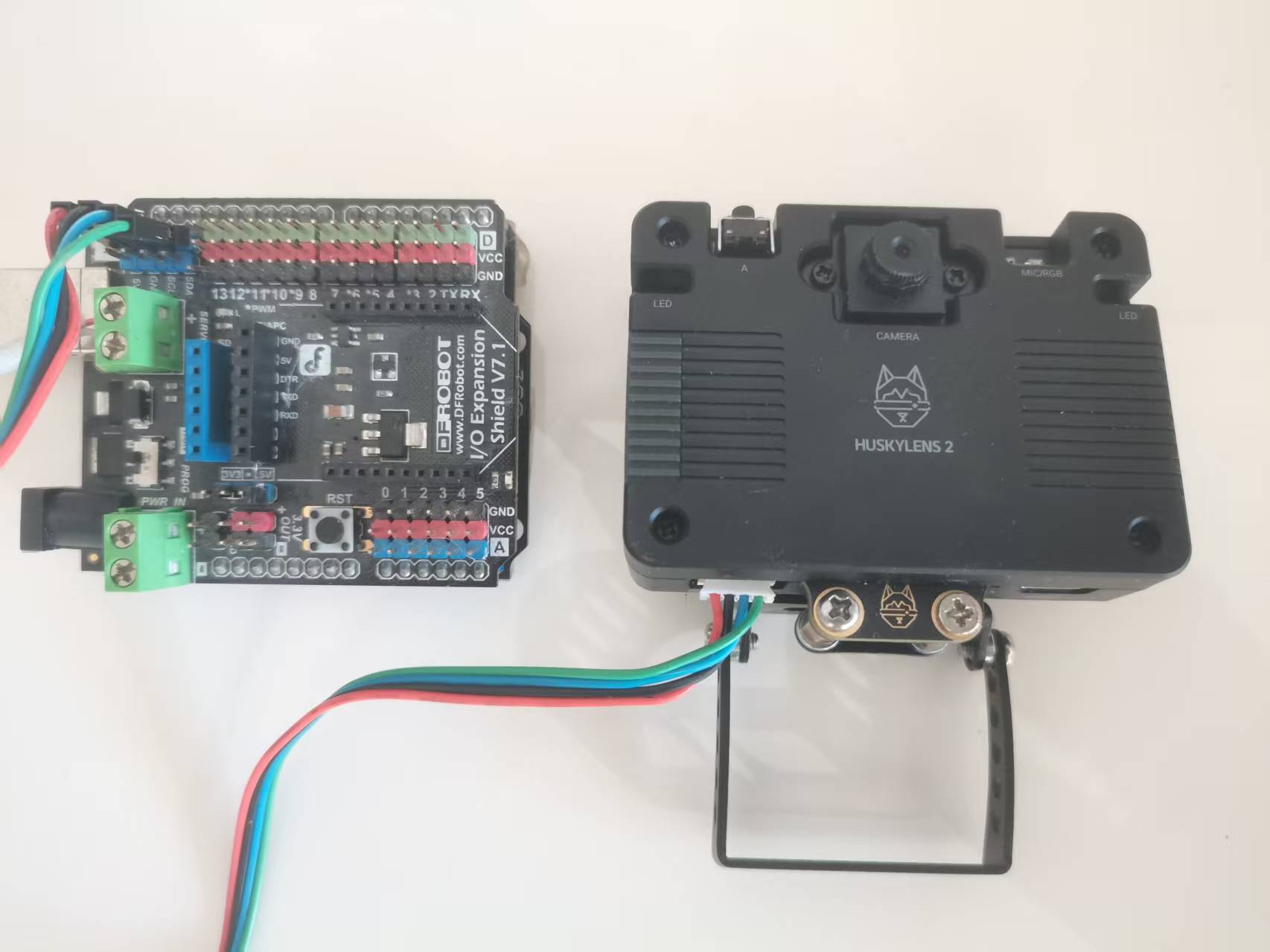

(一)DF 二哈视觉传感器的配置与 Arduino 编程
向 Deepseek 输入需求:“编写 Arduino Uno 与 DF 二哈视觉传感器的通信程序,传感器识别手势(握拳 / 张开)后,将数据通过串口发送至电脑;同时编写 Python 程序,接收串口数据并控制粒子效果,保持粒子效果的逻辑与之前一致。”
将Deepseek写的arduino c程序,自已改写成图形化程序。
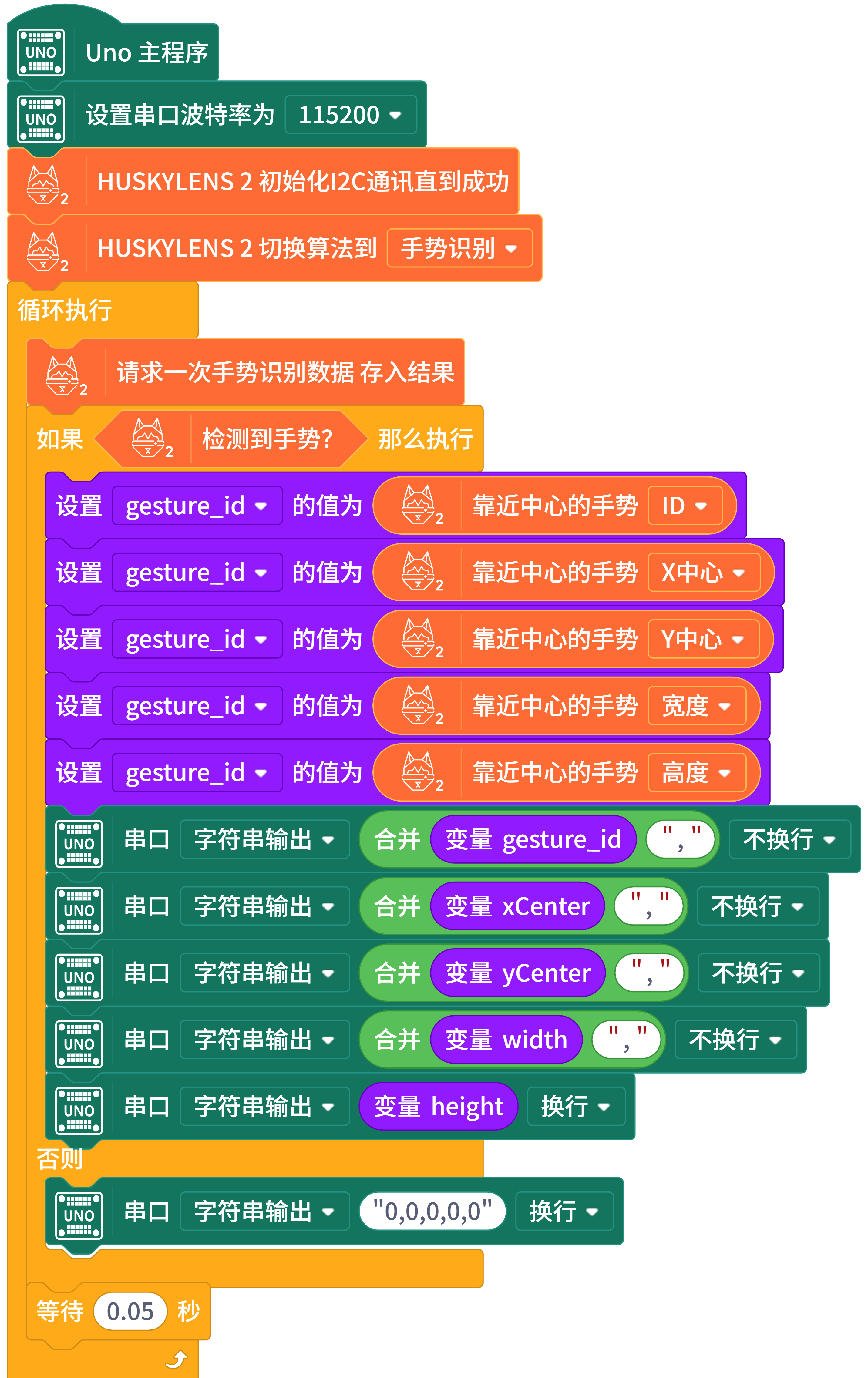
(二)Python 串口通信与粒子效果联动
Deepseek 修改了 Python 程序,新增串口通信模块:使用 PySerial 库打开电脑串口(COM38,波特率 115200),实时读取 Arduino 发送的指令,将指令映射为粒子效果的控制信号。
import pygame
import cv2
import numpy as np
import math
import random
import serial
import serial.tools.list_ports
import threading
import time
# 初始化Pygame
pygame.init()
# 全局变量声明
global WIDTH, HEIGHT, screen
# 初始窗口设置
WIDTH, HEIGHT = 1920, 1080
screen = pygame.display.set_mode((0, 0), pygame.FULLSCREEN)
pygame.display.set_caption("手势粒子效果 - 二哈2手势控制")
# 手势定义(与Arduino保持一致)
GESTURE_NONE = 0
GESTURE_OPEN = 1 # 张开手
GESTURE_CLOSED = 2 # 握拳
GESTURE_TWO = 3 # 数字2
GESTURE_FOUR = 4 # 数字4
# 粒子颜色配置 - 根据手势类型改变颜色主题
class ParticleColors:
@staticmethod
def get_sphere_color(gesture_type):
"""球体粒子颜色 - 根据手势类型变化"""
color_themes = {
GESTURE_OPEN: 'warm', # 暖色
GESTURE_CLOSED: 'cool', # 冷色
GESTURE_TWO: 'vibrant', # 鲜艳色
GESTURE_FOUR: 'neon', # 霓虹色
}
theme = color_themes.get(gesture_type, 'warm')
if theme == 'warm':
return (255, random.randint(100, 200), random.randint(50, 150))
elif theme == 'cool':
return (random.randint(50, 150), random.randint(150, 250), 255)
elif theme == 'vibrant':
return (random.randint(200, 255), random.randint(100, 200), random.randint(0, 100))
elif theme == 'neon':
colors = [(255, 20, 147), (0, 255, 255), (255, 255, 0), (255, 0, 255)]
return random.choice(colors)
elif theme == 'purple':
return (180 + random.randint(0, 75), 70 + random.randint(0, 50), 220 + random.randint(0, 35))
elif theme == 'green':
return (50 + random.randint(0, 50), 180 + random.randint(0, 75), 100 + random.randint(0, 50))
elif theme == 'orange':
return (255, 120 + random.randint(0, 80), 30 + random.randint(0, 50))
else:
return (255, 200, 100)
@staticmethod
def get_contour_color(gesture_type, layer_index, total_layers):
"""轮廓粒子颜色 - 根据手势类型变化"""
ratio = layer_index / total_layers
if gesture_type == GESTURE_OPEN:
# 张开手 - 蓝色渐变
return (100, 150 + int(105 * ratio), 255)
elif gesture_type == GESTURE_CLOSED:
# 握拳 - 红色渐变
return (200 + int(55 * ratio), 100, 50 + int(55 * (1 - ratio)))
elif gesture_type == GESTURE_TWO:
# TWO手势 - 绿色渐变
return (100, 200 + int(55 * ratio), 100 + int(55 * (1 - ratio)))
elif gesture_type == GESTURE_FOUR:
# 摇滚手势 - 紫色渐变
return (150 + int(105 * ratio), 50, 150 + int(105 * (1 - ratio)))
else:
# 默认 - 青色渐变
return (100, 200 + int(55 * ratio), 200 + int(55 * (1 - ratio)))
@staticmethod
def get_falling_color(gesture_type):
"""坠落粒子颜色 - 根据手势类型变化"""
if gesture_type == GESTURE_OPEN:
return (random.randint(150, 200), 255, 255) # 青色
elif gesture_type == GESTURE_CLOSED:
return (255, random.randint(100, 150), random.randint(100, 150)) # 粉色
elif gesture_type == GESTURE_TWO:
return (random.randint(100, 150), 255, random.randint(100, 150)) # 绿色
elif gesture_type == GESTURE_FOUR:
return (255, 255, random.randint(100, 150)) # 黄色
else:
return (255, 255, 255) # 白色
# 粒子基类
class Particle:
def __init__(self, x, y, z=0):
self.x = x
self.y = y
self.z = z
self.vx = 0
self.vy = 0
self.vz = 0
self.size = random.uniform(1.5, 4)
self.lifetime = random.uniform(1.0, 3.0)
self.max_lifetime = self.lifetime
def update_lifetime(self, dt):
self.lifetime -= dt
return self.lifetime > 0
def get_alpha(self):
return max(0.1, min(1.0, self.lifetime / self.max_lifetime))
def draw(self, surface):
alpha = self.get_alpha()
draw_size = max(1, int(self.size * alpha))
if hasattr(self, 'color'):
r, g, b = self.color
draw_color = (int(r * alpha), int(g * alpha), int(b * alpha))
else:
draw_color = (255, 255, 255)
pygame.draw.circle(surface, draw_color, (int(self.x), int(self.y)), draw_size)
# 球体粒子 - 根据手势类型改变行为
class SphereParticle(Particle):
def __init__(self, x, y, z, gesture_type=GESTURE_OPEN):
super().__init__(x, y, z)
self.gesture_type = gesture_type
self.color = ParticleColors.get_sphere_color(gesture_type)
# 根据手势类型调整参数
if gesture_type == GESTURE_OPEN:
self.rotation_speed = random.uniform(0.001, 0.003) # 慢速
self.scatter_distance = random.uniform(200, 400)
elif gesture_type == GESTURE_CLOSED:
self.rotation_speed = random.uniform(0.003, 0.006) # 快速
self.scatter_distance = random.uniform(100, 300)
elif gesture_type == GESTURE_TWO:
self.rotation_speed = random.uniform(0.002, 0.004) # 中速
self.scatter_distance = random.uniform(300, 500)
elif gesture_type == GESTURE_FOUR:
self.rotation_speed = random.uniform(0.005, 0.008) # 非常快
self.scatter_distance = random.uniform(400, 600)
else:
self.rotation_speed = random.uniform(0.002, 0.005)
self.scatter_distance = random.uniform(200, 400)
self.theta = random.uniform(0, 2 * math.pi)
self.phi = random.uniform(0, math.pi)
self.scatter_angle = random.uniform(0, 2 * math.pi)
def update_ball(self, center_x, center_y, ball_radius, rotation_factor):
self.theta += self.rotation_speed * rotation_factor
self.phi += self.rotation_speed * 0.5
self.theta %= 2 * math.pi
# 根据手势类型调整球体形状
if self.gesture_type == GESTURE_TWO:
# TWO手势 - 形成环形
effective_radius = ball_radius * 0.7
elif self.gesture_type == GESTURE_FOUR:
# 摇滚手势 - 不规则形状
effective_radius = ball_radius * (0.8 + 0.4 * math.sin(self.theta * 2))
else:
effective_radius = ball_radius
self.target_x = center_x + effective_radius * math.sin(self.phi) * math.cos(self.theta)
self.target_y = center_y + effective_radius * math.sin(self.phi) * math.sin(self.theta)
# 根据手势类型调整移动速度
if self.gesture_type == GESTURE_CLOSED:
move_factor = 0.15 # 握拳时粒子移动更快
elif self.gesture_type == GESTURE_FOUR:
move_factor = 0.2 # 摇滚手势时粒子移动最快
else:
move_factor = 0.1 # 默认速度
dx = self.target_x - self.x
dy = self.target_y - self.y
self.x += dx * move_factor
self.y += dy * move_factor
def update_scatter(self, center_x, center_y, progress):
if progress < 0.01:
return
current_distance = self.scatter_distance * progress
# 根据手势类型调整散射角度
if self.gesture_type == GESTURE_TWO:
angle = self.scatter_angle + progress * 1 # 慢速旋转
elif self.gesture_type == GESTURE_FOUR:
angle = self.scatter_angle + progress * 3 # 快速旋转
else:
angle = self.scatter_angle + progress * 2 # 正常旋转
target_x = center_x + math.cos(angle) * current_distance
target_y = center_y + math.sin(angle) * current_distance
dx = target_x - self.x
dy = target_y - self.y
# 根据手势类型调整散射速度
if self.gesture_type == GESTURE_CLOSED:
move_factor = 0.03 # 握拳时散射较慢
elif self.gesture_type == GESTURE_OPEN:
move_factor = 0.05 # 张开手时散射正常
else:
move_factor = 0.07 # 其他手势散射较快
self.x += dx * move_factor
self.y += dy * move_factor
# 二哈2手势数据处理器
class HuskyLensHandler:
def __init__(self, port=None):
self.port = port
self.serial_conn = None
self.gesture_data = {
'gesture_id': GESTURE_NONE,
'x': WIDTH // 2,
'y': HEIGHT // 2,
'width': 0,
'height': 0
}
self.running = False
self.thread = None
def find_arduino_port(self):
"""自动查找Arduino端口"""
ports = serial.tools.list_ports.comports()
for port in ports:
if 'Arduino' in port.description or 'CH340' in port.description or 'USB' in port.description:
return port.device
return None
def connect(self):
"""连接到Arduino"""
if self.port is None:
self.port = self.find_arduino_port()
if self.port is None:
print("未找到Arduino设备,请检查连接")
return False
try:
self.serial_conn = serial.Serial(self.port, 115200, timeout=0.1)
print(f"已连接到串口: {self.port}")
return True
except Exception as e:
print(f"连接串口失败: {e}")
return False
def start_reading(self):
"""启动读取线程"""
if self.serial_conn is None:
if not self.connect():
return False
self.running = True
self.thread = threading.Thread(target=self._read_serial_thread)
self.thread.daemon = True
self.thread.start()
return True
def _read_serial_thread(self):
"""串口读取线程"""
while self.running:
try:
if self.serial_conn.in_waiting > 0:
line = self.serial_conn.readline().decode('utf-8').strip()
if line:
self._parse_gesture_data(line)
except Exception as e:
print(f"读取串口数据错误: {e}")
time.sleep(0.1)
def _parse_gesture_data(self, data_str):
"""解析手势数据 - 5个参数:gesture_id,x,y,width,height"""
try:
parts = data_str.split(',')
if len(parts) >= 5:
# 数据格式: gesture_id,x,y,width,height
self.gesture_data['gesture_id'] = int(parts[0])
# 将二哈2的坐标映射到屏幕坐标
# 二哈2分辨率通常为640x480
husky_x = int(parts[1])
husky_y = int(parts[2])
# 映射到屏幕坐标,并进行镜像翻转(左右翻转)
# 原始: self.gesture_data['x'] = int(husky_x * WIDTH / 640)
# 修改为镜像翻转:
self.gesture_data['x'] = int(WIDTH - (husky_x * WIDTH / 480))
# Y坐标保持不变
self.gesture_data['y'] = int(husky_y * HEIGHT / 480)
self.gesture_data['width'] = int(parts[3])
self.gesture_data['height'] = int(parts[4])
except Exception as e:
print(f"解析手势数据错误: {e}")
def get_gesture(self):
"""获取当前手势数据"""
return self.gesture_data.copy()
def stop(self):
"""停止读取"""
self.running = False
if self.thread:
self.thread.join(timeout=1)
if self.serial_conn:
self.serial_conn.close()
def get_hand_state(self):
"""转换为手势状态"""
gesture_id = self.gesture_data['gesture_id']
# 将手势ID映射为状态字符串
if gesture_id == GESTURE_OPEN:
return "OPEN", 1.0
elif gesture_id == GESTURE_CLOSED:
return "CLOSED", 1.0
elif gesture_id == GESTURE_TWO:
return "TWO", 1.0
elif gesture_id == GESTURE_FOUR:
return "FOUR", 1.0
else:
return "UNKNOWN", 0.0
# 主粒子系统 - 根据手势类型调整
class MainParticleSystem:
def __init__(self, num_particles=500):
self.particles = []
self.num_particles = num_particles
self.state = "ball"
self.transition_progress = 0
self.transition_speed = 0.04
self.ball_radius = 150
self.center_x = WIDTH // 2
self.center_y = HEIGHT // 2
self.current_gesture = GESTURE_OPEN
# 初始化粒子
for _ in range(num_particles):
theta = random.uniform(0, 2 * math.pi)
phi = random.uniform(0, math.pi)
x = self.center_x + self.ball_radius * math.sin(phi) * math.cos(theta)
y = self.center_y + self.ball_radius * math.sin(phi) * math.sin(theta)
z = self.ball_radius * math.cos(phi)
particle = SphereParticle(x, y, z, self.current_gesture)
self.particles.append(particle)
def update(self, hand_state, palm_center, gesture_type):
if palm_center:
self.center_x = palm_center[0]
self.center_y = palm_center[1]
# 根据手势类型确定目标状态
if hand_state == "OPEN" or hand_state == "TWO" or hand_state == "FOUR":
target_state = "scattered"
else:
target_state = "ball"
# 根据手势类型调整球体半径
if hand_state == "CLOSED":
self.ball_radius = 80
elif hand_state == "TWO":
self.ball_radius = 120
elif hand_state == "FOUR":
self.ball_radius = 180
elif hand_state == "OPEN":
self.ball_radius = 150
else:
self.ball_radius = 100
# 状态过渡
if self.state != target_state:
if target_state == "scattered":
self.transition_progress += self.transition_speed
if self.transition_progress >= 1:
self.state = "scattered"
self.transition_progress = 1
else:
self.transition_progress -= self.transition_speed
if self.transition_progress <= 0:
self.state = "ball"
self.transition_progress = 0
# 更新当前手势类型
gesture_id_map = {
"OPEN": GESTURE_OPEN,
"CLOSED": GESTURE_CLOSED,
"TWO": GESTURE_TWO,
"FOUR": GESTURE_FOUR,
"UNKNOWN": GESTURE_OPEN
}
self.current_gesture = gesture_id_map.get(hand_state, GESTURE_OPEN)
# 更新粒子
for particle in self.particles:
# 更新粒子颜色和参数
particle.gesture_type = self.current_gesture
particle.color = ParticleColors.get_sphere_color(self.current_gesture)
if self.state == "ball" and self.transition_progress <= 0:
particle.update_ball(self.center_x, self.center_y, self.ball_radius, 1.0)
elif self.state == "scattered" and self.transition_progress >= 1:
particle.update_scatter(self.center_x, self.center_y, 1.0)
elif target_state == "scattered":
particle.update_scatter(self.center_x, self.center_y, self.transition_progress)
def draw(self, surface):
for particle in self.particles:
particle.draw(surface)
# 手部轮廓粒子系统
class HandContourSystem:
def __init__(self):
self.contour_particles = []
self.falling_particles = []
self.particles_per_segment = 10
self.contour_width_layers = 5
self.max_falling_particles = 80
self.current_gesture = GESTURE_OPEN
# 用于存储手部位置和大小的引用
self.current_center = None
self.current_size = 100
def update(self, hand_center, hand_size, gesture_type):
# 更新当前手部位置、大小和手势类型
self.current_center = hand_center
self.current_size = hand_size
self.current_gesture = gesture_type
# 根据手部位置和大小生成轮廓粒子
if hand_center and hand_size > 20:
if len(self.contour_particles) == 0:
self.generate_contour_particles(hand_center, hand_size)
# 更新现有粒子
self.update_existing_particles()
# 根据手势类型生成坠落粒子
if gesture_type == GESTURE_OPEN:
self.generate_falling_particles(frequency=0.6)
elif gesture_type == GESTURE_CLOSED:
self.generate_falling_particles(frequency=0.2)
elif gesture_type == GESTURE_TWO:
self.generate_falling_particles(frequency=0.4, pattern="circle")
elif gesture_type == GESTURE_FOUR:
self.generate_falling_particles(frequency=0.8, pattern="explosion")
else:
self.generate_falling_particles(frequency=0.4)
# 更新坠落粒子
self.update_falling_particles()
def generate_contour_particles(self, center, size):
"""生成圆形轮廓粒子(模拟手部轮廓)"""
num_particles = 50
self.contour_particles = [] # 清空现有粒子
for i in range(num_particles):
angle = 2 * math.pi * i / num_particles
radius = size * 0.8
# 创建多层轮廓
for layer in range(self.contour_width_layers):
offset_radius = radius + layer * 3
offset_x = center[0] + offset_radius * math.cos(angle + layer * 0.1)
offset_y = center[1] + offset_radius * math.sin(angle + layer * 0.1)
# 创建轮廓粒子
particle = self.create_contour_particle(offset_x, offset_y, layer, angle, center, size)
self.contour_particles.append(particle)
def create_contour_particle(self, x, y, layer_index, angle, center, size):
"""创建单个轮廓粒子"""
# 定义一个内部类
class SimpleContourParticle(Particle):
def __init__(self, x, y, layer_index, total_layers, angle, center, size, gesture_type):
super().__init__(x, y)
self.color = ParticleColors.get_contour_color(gesture_type, layer_index, total_layers)
self.size = random.uniform(2.0, 4.5)
self.speed = random.uniform(0.02, 0.05)
self.angle = angle
self.layer_index = layer_index
self.total_layers = total_layers
self.center = center
self.base_size = size
self.gesture_type = gesture_type
def update(self):
# 根据手势类型调整移动速度
if self.gesture_type == GESTURE_FOUR:
self.speed = random.uniform(0.05, 0.08) # 摇滚手势更快
elif self.gesture_type == GESTURE_CLOSED:
self.speed = random.uniform(0.01, 0.03) # 握拳更慢
self.angle += self.speed
# 根据手势类型调整半径
if self.gesture_type == GESTURE_TWO:
radius = self.base_size * 0.6 + self.layer_index * 3 # TWO手势更小
elif self.gesture_type == GESTURE_FOUR:
radius = self.base_size * (0.8 + 0.2 * math.sin(self.angle * 3)) + self.layer_index * 3 # 摇滚手势波动
else:
radius = self.base_size * 0.8 + self.layer_index * 3
self.x = self.center[0] + radius * math.cos(self.angle)
self.y = self.center[1] + radius * math.sin(self.angle)
return self.update_lifetime(0.016)
return SimpleContourParticle(x, y, layer_index, self.contour_width_layers, angle, center, size, self.current_gesture)
def update_existing_particles(self):
"""更新现有粒子"""
if self.current_center is None:
return
for particle in self.contour_particles[:]:
# 更新粒子的中心位置、大小和手势类型
if hasattr(particle, 'center'):
particle.center = self.current_center
if hasattr(particle, 'base_size'):
particle.base_size = self.current_size
if hasattr(particle, 'gesture_type'):
particle.gesture_type = self.current_gesture
particle.color = ParticleColors.get_contour_color(
self.current_gesture,
particle.layer_index,
particle.total_layers
)
if hasattr(particle, 'update'):
if not particle.update():
# 重置粒子
particle.lifetime = random.uniform(1.0, 3.0)
particle.max_lifetime = particle.lifetime
def generate_falling_particles(self, frequency=0.4, pattern="random"):
"""生成坠落粒子 - 根据手势类型改变模式"""
if len(self.falling_particles) >= self.max_falling_particles:
return
if self.current_center is None:
return
if random.random() < frequency:
# 根据模式生成粒子
if pattern == "circle":
# 圆形模式 - 用于数字2手势
angle = random.uniform(0, 2 * math.pi)
distance = random.uniform(0, self.current_size * 0.3)
start_x = self.current_center[0] + distance * math.cos(angle)
start_y = self.current_center[1] + distance * math.sin(angle)
elif pattern == "explosion":
# 爆炸模式 - 用于数字4手势
angle = random.uniform(0, 2 * math.pi)
distance = random.uniform(self.current_size * 0.5, self.current_size * 1.5)
start_x = self.current_center[0] + distance * math.cos(angle)
start_y = self.current_center[1] + distance * math.sin(angle)
else:
# 随机模式
angle = random.uniform(0, 2 * math.pi)
distance = random.uniform(0, self.current_size * 0.5)
start_x = self.current_center[0] + distance * math.cos(angle)
start_y = self.current_center[1] + distance * math.sin(angle)
particle = FallingParticle(start_x, start_y, self.current_gesture)
self.falling_particles.append(particle)
def update_falling_particles(self):
alive_particles = []
for particle in self.falling_particles:
if particle.update_fall(0.016): # 假设60fps
alive_particles.append(particle)
self.falling_particles = alive_particles
def draw(self, surface):
for particle in self.contour_particles:
particle.draw(surface)
for particle in self.falling_particles:
particle.draw(surface)
# 坠落粒子
class FallingParticle(Particle):
def __init__(self, start_x, start_y, gesture_type=GESTURE_OPEN):
super().__init__(start_x, start_y)
self.gesture_type = gesture_type
self.color = ParticleColors.get_falling_color(gesture_type)
# 根据手势类型调整物理参数
if gesture_type == GESTURE_OPEN:
self.fall_speed = random.uniform(1.5, 3.0)
self.wind_force = random.uniform(-0.2, 0.2)
self.size = random.uniform(1.8, 3.0)
elif gesture_type == GESTURE_CLOSED:
self.fall_speed = random.uniform(0.5, 1.5)
self.wind_force = random.uniform(-0.1, 0.1)
self.size = random.uniform(2.0, 3.5)
elif gesture_type == GESTURE_TWO:
self.fall_speed = random.uniform(2.0, 4.0)
self.wind_force = random.uniform(-0.3, 0.3)
self.size = random.uniform(2.5, 4.0)
elif gesture_type == GESTURE_FOUR:
self.fall_speed = random.uniform(3.0, 6.0)
self.wind_force = random.uniform(-0.5, 0.5)
self.size = random.uniform(3.0, 5.0)
else:
self.fall_speed = random.uniform(1.5, 4.0)
self.wind_force = random.uniform(-0.3, 0.3)
self.size = random.uniform(1.8, 3.5)
self.vx = random.uniform(-0.5, 0.5)
self.vy = random.uniform(-1.0, 0)
self.lifetime = random.uniform(2.0, 6.0)
self.max_lifetime = self.lifetime
def update_fall(self, dt):
self.vy += self.fall_speed * dt
self.vx += self.wind_force * dt
self.x += self.vx
self.y += self.vy
if self.y > HEIGHT + 50:
return False
if self.x < -50 or self.x > WIDTH + 50:
return False
return self.update_lifetime(dt)
# 主程序
def main():
global screen, WIDTH, HEIGHT
# 初始化二哈2处理器
husky_handler = HuskyLensHandler()
# 尝试连接二哈2
if not husky_handler.connect():
print("警告: 无法连接到二哈2,将使用虚拟手势数据")
use_virtual_hand = True
else:
husky_handler.start_reading()
use_virtual_hand = False
print("二哈2连接成功!")
# 初始化粒子系统
main_particles = MainParticleSystem(num_particles=600)
hand_contour = HandContourSystem()
clock = pygame.time.Clock()
running = True
last_time = pygame.time.get_ticks()
# 手势状态
hand_state = "UNKNOWN"
gesture_strength = 1.0 # 固定强度为1.0,因为二哈2不提供置信度
palm_x, palm_y = WIDTH // 2, HEIGHT // 2
hand_size = 100
# 调试信息
debug_font = pygame.font.SysFont("simhei", 24)
show_debug = True
# 虚拟手控制(用于测试)
virtual_hand_pos = [WIDTH // 2, HEIGHT // 2]
virtual_hand_size = 100
virtual_gesture = "UNKNOWN"
# 手势名称映射
gesture_names = {
GESTURE_NONE: "无手势",
GESTURE_OPEN: "张开手",
GESTURE_CLOSED: "握拳",
GESTURE_TWO: "数字2手势",
GESTURE_FOUR: "数字4手势",
}
while running:
current_time = pygame.time.get_ticks()
dt = (current_time - last_time) / 1000.0
last_time = current_time
# 事件处理
for event in pygame.event.get():
if event.type == pygame.QUIT:
running = False
elif event.type == pygame.KEYDOWN:
if event.key == pygame.K_ESCAPE:
running = False
elif event.key == pygame.K_f:
# 切换全屏
if screen.get_flags() & pygame.FULLSCREEN:
screen = pygame.display.set_mode((1200, 800))
WIDTH, HEIGHT = 1200, 800
else:
screen = pygame.display.set_mode((0, 0), pygame.FULLSCREEN)
WIDTH, HEIGHT = screen.get_size()
# 更新粒子中心位置
palm_x, palm_y = WIDTH // 2, HEIGHT // 2
virtual_hand_pos = [palm_x, palm_y]
elif event.key == pygame.K_SPACE:
main_particles.state = "scattered" if main_particles.state == "ball" else "ball"
elif event.key == pygame.K_r:
hand_contour = HandContourSystem()
elif event.key == pygame.K_d:
show_debug = not show_debug
elif event.key == pygame.K_1:
virtual_gesture = "OPEN"
elif event.key == pygame.K_2:
virtual_gesture = "CLOSED"
elif event.key == pygame.K_3:
virtual_gesture = "TWO"
elif event.key == pygame.K_4:
virtual_gesture = "FOUR"
elif event.key == pygame.K_0:
virtual_gesture = "UNKNOWN"
elif event.type == pygame.MOUSEMOTION:
virtual_hand_pos = list(event.pos)
# 获取手势数据
if not use_virtual_hand:
# 从二哈2获取数据
gesture_data = husky_handler.get_gesture()
hand_state, gesture_strength = husky_handler.get_hand_state()
# 获取手势ID对应的名称
gesture_id = gesture_data['gesture_id']
gesture_name = gesture_names.get(gesture_id, "未知手势")
# 更新手部位置和大小
if gesture_data['gesture_id'] != GESTURE_NONE:
palm_x = gesture_data['x']
palm_y = gesture_data['y']
hand_size = max(gesture_data['width'], gesture_data['height']) * 2
else:
# 使用虚拟手数据
hand_state = virtual_gesture
gesture_strength = 1.0
palm_x, palm_y = virtual_hand_pos
# 获取当前手势ID
gesture_id_map = {
"OPEN": GESTURE_OPEN,
"CLOSED": GESTURE_CLOSED,
"TWO": GESTURE_TWO,
"FOUR": GESTURE_FOUR,
"UNKNOWN": GESTURE_NONE
}
gesture_id = gesture_id_map.get(hand_state, GESTURE_NONE)
gesture_name = gesture_names.get(gesture_id, "未知手势")
# 鼠标滚轮调整手部大小
if pygame.mouse.get_pressed()[0]:
virtual_hand_size = min(200, virtual_hand_size + 2)
elif pygame.mouse.get_pressed()[2]:
virtual_hand_size = max(50, virtual_hand_size - 2)
hand_size = virtual_hand_size
# 限制手部位置
palm_x = max(50, min(WIDTH - 50, palm_x))
palm_y = max(50, min(HEIGHT - 50, palm_y))
hand_size = max(30, min(200, hand_size))
# 清屏
screen.fill((8, 8, 20))
# 更新和绘制主粒子
main_particles.update(hand_state, (palm_x, palm_y), gesture_id)
main_particles.draw(screen)
# 更新和绘制手部轮廓
hand_contour.update((palm_x, palm_y), hand_size, gesture_id)
hand_contour.draw(screen)
# 显示调试信息
if show_debug:
debug_info = [
f"手势: {gesture_name} ({hand_state})",
f"位置: ({int(palm_x)}, {int(palm_y)})",
f"大小: {int(hand_size)}",
"--- 控制 ---",
"ESC: 退出",
"F: 全屏切换",
"空格: 切换粒子状态",
"R: 重置轮廓",
"D: 切换调试信息"
]
if use_virtual_hand:
debug_info.insert(0, "模式: 虚拟手控制")
debug_info.insert(4, "1:张开手 2:握拳 3:TWO 4:摇滚")
debug_info.insert(5, "5:数字1 6:数字2 7:数字3 0:未知")
debug_info.insert(6, "鼠标移动: 控制手部位置")
debug_info.insert(7, "鼠标左右键: 调整手部大小")
else:
debug_info.insert(0, "模式: 二哈2手势控制")
for i, info in enumerate(debug_info):
debug_text = debug_font.render(info, True, (255, 255, 255))
screen.blit(debug_text, (10, 10 + i * 25))
# 显示手势效果说明
effect_info = [
"--- 手势效果说明 ---",
"张开手: 蓝色渐变,粒子散射",
"握拳: 红色渐变,粒子聚集",
"TWO手势: 绿色渐变,圆形效果",
"摇滚手势: 紫色渐变,爆炸效果",
"数字手势: 不同颜色主题"
]
for i, info in enumerate(effect_info):
debug_text = debug_font.render(info, True, (200, 200, 200))
screen.blit(debug_text, (WIDTH - 300, 10 + i * 25))
# 更新显示
pygame.display.flip()
clock.tick(60)
# 清理
if not use_virtual_hand:
husky_handler.stop()
pygame.quit()
if __name__ == "__main__":
main()演示视频
六、项目总结与拓展思考
本项目借助 Deepseek 的代码生成与调试能力,快速完成了从软件模拟的视觉识别到硬件集成的交互系统搭建,实现了粒子效果的多模式控制。项目中,Deepseek 不仅承担了代码编写的工作,还在调试阶段提供了针对性的优化建议,大幅降低了开发周期与技术门槛。
从拓展角度看,可进一步优化 DF 二哈视觉传感器的识别精度(如增加手势种类,实现粒子颜色、大小的多维度控制);也可将 Arduino 与其他硬件(如舵机、LED 灯带)结合,实现粒子效果与物理硬件的联动交互;此外,还可利用 Deepseek 优化粒子效果的渲染算法,实现更复杂的 3D 粒子场景构建。
本项目验证了 AI 大模型在快速原型开发与硬件软件集成中的实用价值,也为视觉交互与粒子效果结合的创意项目提供了可复用的技术框架。



 他的勋章
他的勋章
鳄鱼2025.12.10
让我们脑洞大开
QFyXUwRx2025.12.10
会玩会玩!
小含糊online2025.12.09
会玩会玩!
木子哦2025.12.08
会玩会玩!